CB Sounddesign
Decent Sampler instrument bundle
Terminal Skyline
Vol 1 — The Neural Grid · keys & synths
Vol 2 — The Corrupted Haze · pads & textures
Two volumes, 176 presets, one instrument panel. Both volumes run on the same engine and the same twenty-four knobs and one impulse-response menu, so anything you learn on one applies to the other. This manual covers the shared engine first, then each volume and its full preset list.
Requires
Decent Sampler 1.11 or later, free from Decent Samples. Runs standalone or as VST3, AU or AAX on macOS and Windows.
Contents
Vol 1: 97 presets, 79
SYNTH and 18
DARK. Vol 2: 79 presets, 48
VOID and 31
STRANGE.
Keep the folder together
Presets reference samples and impulse responses by relative path. Move the whole volume folder, never the
.dspreset files alone.
How to read this manual
Part one is the engine — installation, the panel, and every control. Read it once and it covers both volumes. Part two is Vol 1, part three is Vol 2; each opens with the character of the volume, its categories and its complete preset list. Part four is troubleshooting and licensing. If you own only one volume, its part plus part one is your whole manual.
Part one
Installation
- Install Decent Sampler if you do not have it. The player is free; nothing here requires the paid extras.
- Unzip the volume anywhere you keep sample libraries. Keep the folder intact — the .dspreset files, the Samples folder and the IR folder must stay in the same relative positions.
- In Decent Sampler press Browse, point it at the folder, and the presets appear. Both volumes can live under one parent folder and be browsed together.
- Load a preset and play. The < and > arrows either side of the preset name step through the folder, which is the fastest way to audition a volume.
Preset names carry their category as a prefix — SYNTH_, DARK_, VOID_, STRANGE_ — so an alphabetical file list is already sorted by character. Type a prefix into Decent Sampler's search to see one category at a time.
Part one
The panel at a glance
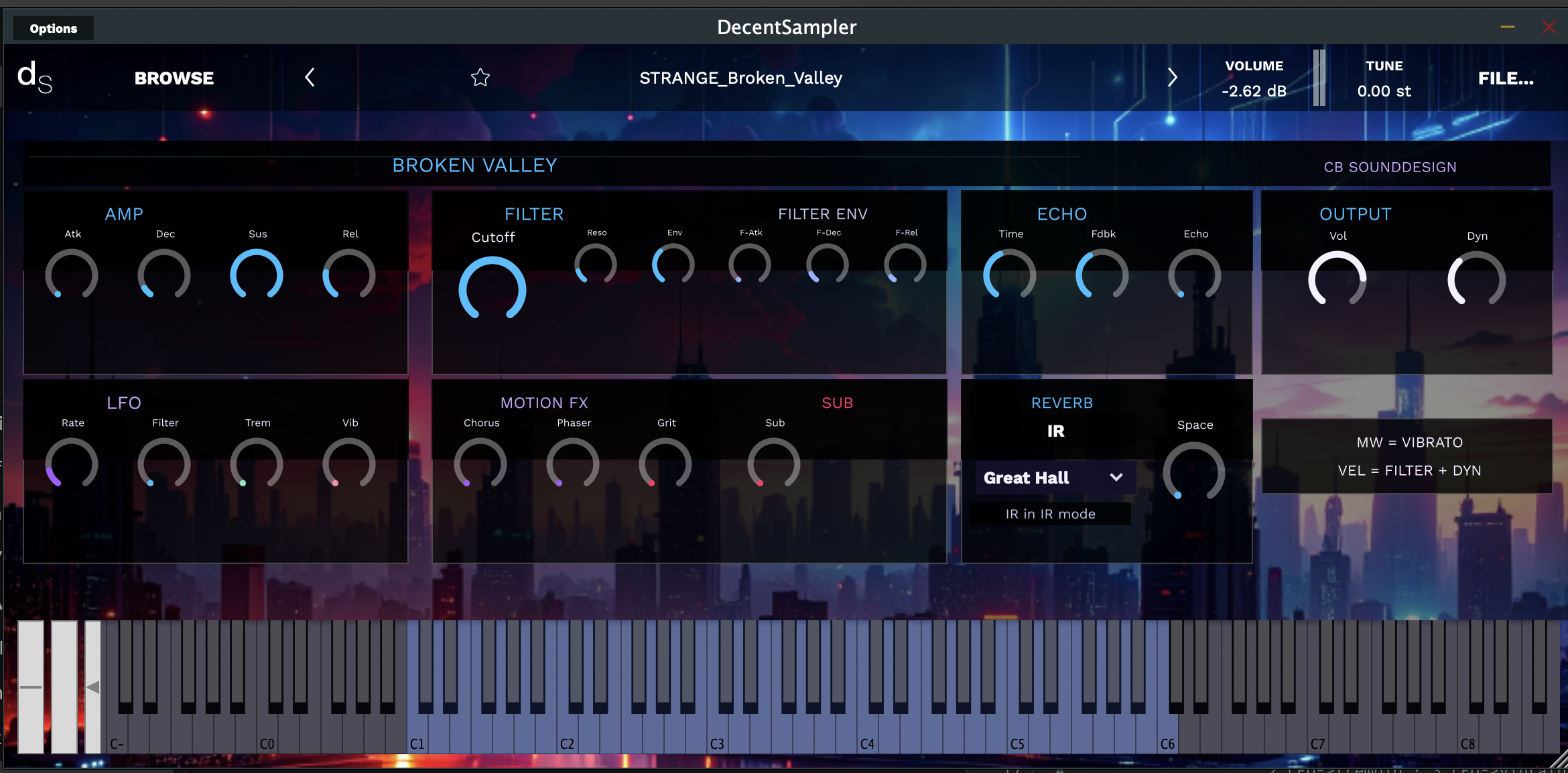
One layout for all 176 presets. Eight panels in two rows: amplitude, filter and its envelope, echo and output along the top; LFO, motion effects, sub and reverb along the bottom. Every knob is live — there are no hidden pages and no menus beyond the reverb selector.
 1
2
3
4
5
6
7
8
9
10
11
12
13
1
2
3
4
5
6
7
8
9
10
11
12
13
Figure 1 — STRANGE_Broken_Valley loaded, with the thirteen zones
1Preset bar — Decent Sampler's own: Browse, the arrows, favourite star, master volume and tune.
2Name plate — the preset without its category prefix, tinted to the volume's accent colour.
3Amp — the amplitude envelope: attack, decay, sustain, release.
4Filter — cutoff and resonance, the largest knob on the panel.
5Filter env — envelope amount, then its own attack, decay and release.
6Echo — delay time, feedback and mix.
7Output — instrument volume and Dyn, the velocity sensitivity.
8LFO — one LFO, one rate, three destinations: filter, tremolo, vibrato.
9Motion FX — chorus, phaser and grit, the movement and dirt section.
10Sub — a synthesised octave below, mixed under the sample.
11Reverb — convolution: an impulse response menu and one Space control.
12Mapping card — a fixed reminder: mod wheel is vibrato, velocity drives filter and dynamics.
13Keyboard — the lit keys are the sampled range; grey keys are extrapolated.
Two habits worth forming
Every knob resets to its stored value when you reload the preset — there is no undo, so a preset you have edited into something better should be saved with File… → Save as under a new name. And the coloured dot at the foot of each knob is its current position at a glance: a row of dots at the bottom left means that whole section is switched out of the sound.
Part one
Control reference
Amp
Atk
Fade-in. Near zero the sample's own transient comes through, which is where the keys and plucks live; wound up, even a percussive source becomes a swell. The fastest way to turn a Vol 1 key into a Vol 2 pad.
Dec
How quickly the note falls from its peak to the sustain level. With Sus at full it does nothing audible — lower Sus first if Dec seems dead.
Sus
The level a held note settles at. Full for pads and drones; pulled back for plucks and stabs, where Dec then shapes the fall.
Rel
The tail after key-up. Long releases plus Echo and Space is what makes these presets overlap into each other; if a part sounds muddy, this is the first control to shorten.
Filter and filter envelope
Cutoff
A low-pass filter, and the main tone control of the whole instrument. It is also the destination velocity and the LFO reach for, so the value you set is a ceiling those two work beneath — wide open leaves them nothing to open into.
Reso
Emphasis at the cutoff. A little adds focus and vowel; a lot turns filter sweeps into whistles. On the noisier DARK and STRANGE material it can get shrill quickly — add it after you have set Cutoff, not before.
Env
How much the filter envelope moves the cutoff. At zero the three knobs beside it do nothing at all, which is the usual reason a filter envelope seems broken.
F-Atk
How long the filter takes to open. Slow attacks with high Env give the long upward bloom that most of the Vol 2 pads are built on.
F-Dec
The fall back towards Cutoff while the note is held. Short decay plus high Env is a classic plucked-synth attack; long decay is a slow filter breath.
F-Rel
What the filter does after key-up. Set longer than the amp release and notes darken as they fade, which reads as distance; set shorter and they close off abruptly.
LFO
One LFO with one rate and three separate depths, so the same movement can appear in three places at once. It runs free rather than in sync, which is deliberate: nothing here should lock to the grid.
Rate
Slow is drift and breathing; fast is texture and buzz. Almost everything musical here happens in the bottom third of the knob.
Filter
LFO into cutoff. A small amount at a slow rate is what keeps a long pad from sounding like a held sample.
Trem
LFO into level. Faster rates give the pulsing, half-broken quality the VOID presets use a lot of.
Vib
LFO into pitch, and the depth the mod wheel adds to. Set the knob for the vibrato that is always present and let the wheel take it further when you want it.
Motion FX and Sub
Chorus
Width and thickness. Generous amounts suit pads; on a bass or a lead it smears the pitch centre, so keep it low there.
Phaser
Slow sweeping notches. The most character-changing knob in this section — a quarter turn is usually enough for a static texture to start moving.
Grit
Saturation and breakup, and the reason the bundle sounds like hardware rather than a sample player. It also raises apparent loudness, so trim Vol after a large move. This is where corrupted comes from in Vol 2.
Sub
A synthesised octave below the played note, mixed under the sample. Adds weight without muddying the mid-range — the most useful single knob for making a thin texture sit in a mix. Roll it off in dense arrangements, where it will fight the bass part.
Echo, Reverb and Output
Time / Fdbk / Echo
Delay time, how many repeats, and how much of it you hear. Free-running, not tempo-synced: short times act as a slap that thickens the attack, long ones as rhythm you have to place by ear against the track.
IR menu
The convolution space — Great Hall is the default on most presets. Changing it changes the character far more than Space does; audition the menu before reaching for the knob.
Space
Reverb amount. High settings plus a long release will push a part behind everything else in a mix, which is usually the intention on the ambient material and rarely what you want on a lead.
Vol
Instrument output, ahead of Decent Sampler's own master volume. Use this one to match presets to each other and leave the master where it is.
Dyn
How much velocity affects level. At zero every note is the same weight, which suits drones and sustained beds; wound up, the instrument plays like a keyboard.
Performance mappings
MW = Vibrato
The mod wheel adds pitch modulation on top of the Vib setting, at the LFO's rate. Every preset in both volumes responds — it is the one gesture that always works.
Vel = Filter + Dyn
Velocity opens the filter and raises the level together, so hard playing is brighter as well as louder. Play softly into a preset with Cutoff set low and it whispers; the same preset dug into becomes aggressive without touching a knob.
Sustain pedal
Held notes keep their full release. With long releases and a pedal, a few chords stack into a bed — effective, and worth watching the voice count for.
Range
The lit keys are what was sampled. Play well outside it and you get transposition artefacts — often useful downwards for drones, less so upwards.
Automation
Every knob on the panel is exposed to the host as a named parameter, so filter sweeps and grit rises can be automated rather than performed. The IR menu is a discrete parameter and jumps between spaces rather than crossfading.
Part two · Volume one
The Neural Grid
Vol 1 · 97 presets
The Neural Grid
Keys & synths · SYNTH and DARK
The playable half of the bundle. These are presets you hold chords on and write parts with: struck and plucked tone, defined attacks, tuned bodies. The palette is indigo and red — hard neon over a wet street — and the material is bright enough to sit at the front of a mix without much processing.
Categories
SYNTH · 79
The core of the volume. Tuned, sustaining, keyboard-shaped: electric keys, bells, leads, basses and organ-adjacent tone, all with a usable transient. Start here for anything that needs to be played rather than laid under.
DARK · 18
The same engine pushed lower and dirtier — deeper registers, more grit, more noise in the body. Use them where a SYNTH preset is too clean or too polite: sub-heavy stabs, industrial keys, menace under a melody.
Turning a Vol 1 preset into a Vol 2 one
Raise Atk until the transient disappears, lengthen Rel, pull Cutoff down, then add Space and a little LFO into filter. Nearly every SYNTH preset has a usable pad hiding a minute away — which is also the quickest route to two parts that plainly belong together.
Part two · Preset list
Volume one — 97 presets
SYNTH — 79
01 Anarchy Thrall02 Archive Fragment03 Barren Blade04 Bleak Ether05 Blue Leak06 Cascade Revelation07 Chaos Indigo08 Cinder Fire09 Circuit Hub10 Circuit Reign11 Cobalt Proxy12 Concrete Resin13 Corporate Decay14 Corporate Pollen15 Crimson Ruby16 Dawn Paradox17 Defect Strain18 Delta Drift19 Desire Dross20 Fissure Mystery21 Fracture Fractal22 Grime Pollen23 Grove False24 Hazard Detritus25 Holo Steam26 Horror Shift27 Host District28 Hunger Horror29 Hunger Panic30 Ink Ion31 Ivory Velocity32 Lowlife Orange33 Marsh Forge34 Marsh Mimic35 Marsh Vector36 Maze Valley37 Memory Star38 Mono Catalyst39 Nebula Treachery40 Neon Dusk41 Neutron City42 Node Veil43 Opal Thunder44 Pattern Spawn45 Peak Edge46 Phantom Infra47 Plateau Galaxy48 Purple Star49 Ray Broken50 Ray Gate51 Red Voltage52 Reflection Hunger53 Reign Indigo54 Residual Last55 Resonance Prism56 Riot Shadow57 River Deep58 Rogue Bolt59 Rogue Star60 Ruin Holo61 Scar Dismal62 Sector Plateau63 Sequence Corporate64 Smog Venom65 Solitude Sequence66 Solvent Rogue67 Spire Ion68 Star Pearl69 Static Desire70 Steam Dismal71 Terminal Abyss72 Terminal Verge73 Trace Operator74 Track Fuel75 Transmission Neural76 Trench False77 Voltage Exile78 Wired Nihil79 Xenon Pond
DARK — 18
01 Core Vermilion02 Desire Umber03 Downlink Brown04 False Sonic05 Fear Residual06 Forgotten Fissure07 Frame Sequence08 Fuel Sensor09 Indigo Cipher10 Ink Faded11 Ink Pulsar12 Jungle Target13 Leak False14 Mono Cobalt15 Null Wired16 Range Soda17 Relic Pulsar18 Wired Blue
Part three · Volume two
The Corrupted Haze

Vol 2 · 79 presets
The Corrupted Haze
Pads & textures · VOID and STRANGE
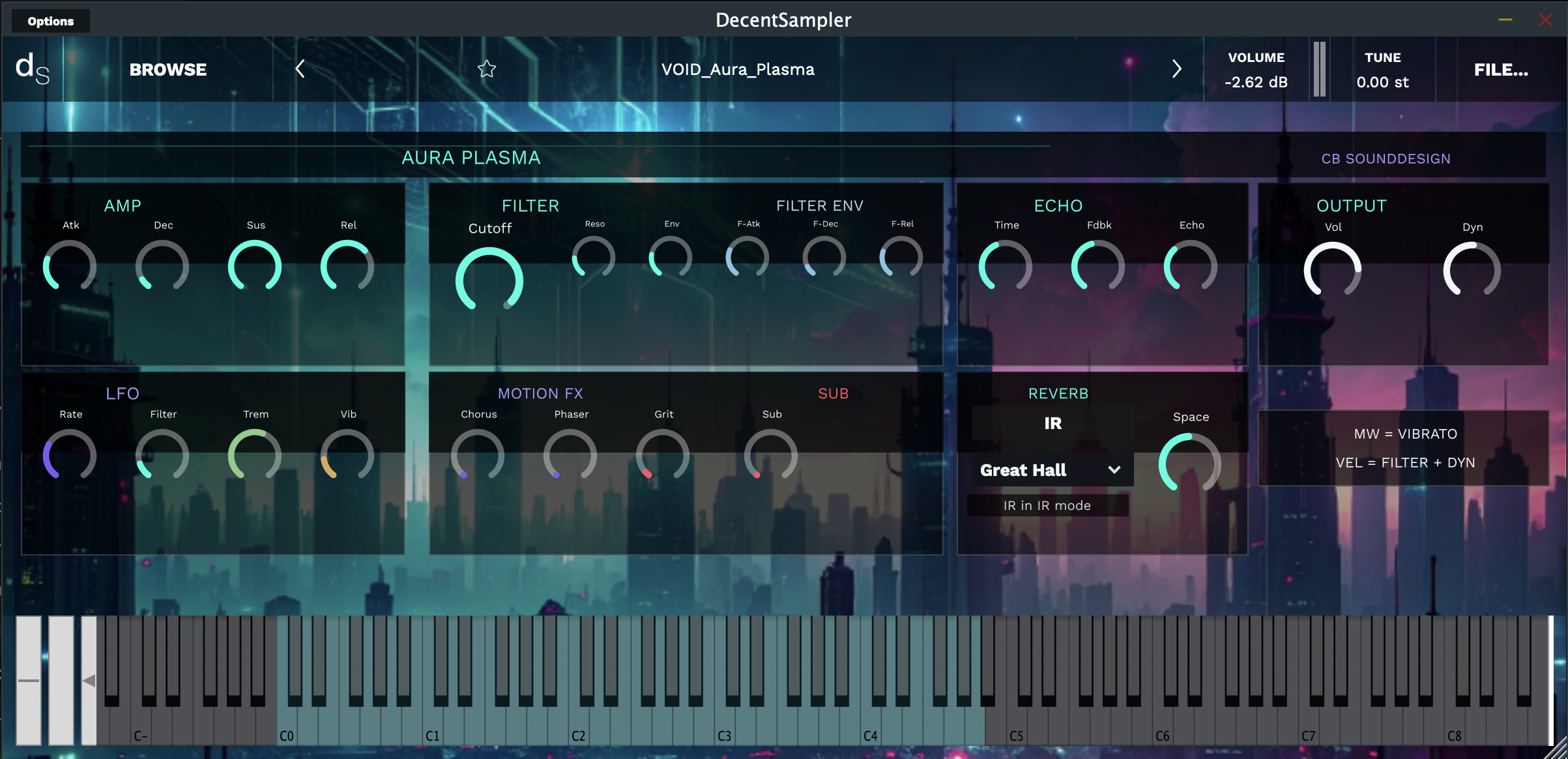
The atmospheric half. Slow attacks, long tails, movement built into the sample rather than added by the panel. The palette moves to teal and magenta, and the material is meant to sit underneath something else — scoring beds, transitions, and the air between parts.
Figure 2 — VOID_Aura_Plasma. Same panel, same controls; the accent moves to teal and the sampled range sits lower on the keyboard
Categories
VOID · 48
Pads and drones. Sustained, wide, slow to arrive and slow to leave, with enough internal motion that one held chord holds interest for a long time. The volume’s backbone.
STRANGE · 31
Textures and damaged tone: unstable tuning, granular breakup, resonant artefacts, sounds that were something else before the engine got to them. Less predictable and less polite — use them as events and colour rather than as beds.
Making a bed out of two presets
Layer a VOID pad with a STRANGE texture on the same MIDI channel, set the texture’s Vol to about a third of the pad’s and roll its Cutoff back. The pad carries the harmony, the texture supplies the detail — the same trick the denser presets in this volume use internally.
Part three · Preset list
Volume two — 79 presets
VOID — 48
01 Aura Plasma02 Blaze Fossil03 Brown Prism04 Cavern Forgotten05 Core Prime06 Delta Null07 Dest Virtual08 District Teal09 Enigma Blight10 Enigma Swamp11 Forge Metal12 Friction Track13 Fuse Lake14 Fuse Noira15 Gloom Smoke16 Grove Puncture17 Horizon Void18 Hyper Dawn19 Hyper Vermilion20 Iron Indigo21 Liquid Soda22 Lost Wreck23 Matrix Barren24 Mesh Planet25 Murk Chaos26 Murk Soda27 Noir Cipher28 Noir Industrial29 Orbit Gamma30 Pattern Hide31 Plasma Splinter32 Plateau Sector33 Quant Liquid34 Remote Metal35 Resin Echo36 Root Xenon37 Rust Jungle38 Sage Cobalt39 Salvage Splinter40 Shock Reflection41 Sky Poly42 Solder Entropy43 Solder Frame44 Steel Blight45 Sulphur Green46 Treachery Ether47 Vector Vale48 Veil City
STRANGE — 31
01 Abyss Orange02 Augment Dismal03 Broken Valley04 Brown Lost05 Cascade Defect06 Delta Plasma07 Desire Circuit08 Extraction Brown09 Fire Static10 Forge Void11 Fracture Remote12 Galaxy Factory13 Grave Revelation14 Green Horizon15 Grey Nightmare16 Grove Onslaught17 Ivory Blue18 Lowlife Beam19 Matrix Drift20 Mesh False21 Neutron Obsidian22 Node Sulphur23 Parallel Zombie24 Phantom Lowlife25 Poly Void26 Replicant Astral27 Scarcity Core28 Sensor Piston29 System Rift30 Valve Pattern31 Xenon Bio
Part four
When something goes wrong
The preset loads silent
Decent Sampler could not find the samples — the folder was moved or only partly copied. Re-extract the volume and browse to it again rather than moving .dspreset files on their own.
No reverb
The IR folder is missing, or the menu is on a space that failed to load. Re-select from the menu; if it stays dry, the folder did not come across.
Filter envelope does nothing
Env is at zero — the three F-knobs are scaled by it.
Dec does nothing
Sus is at full, so the note never falls to a lower level. Lower Sus first.
Velocity has no effect
Dyn is down and Cutoff is already open, so velocity has nothing to move. Lower Cutoff, raise Dyn.
Louder than the last preset
Grit raises apparent level. Trim Vol rather than the host fader, so the preset stays matched to its neighbours.
Notes smear together
Long Rel plus Echo plus Space. Shorten the release first — it is nearly always the release.
High notes sound thin
You are playing above the sampled range shown on the keyboard. Transpose down an octave and use Sub for weight.
Crackles on dense chords
Voice count. Shorten Rel, raise the buffer size in your host, or thin the part — long releases with a pedal stack more voices than you would guess.
Edits vanished
Knob positions are not written back into the preset. Use File… → Save as under a new name; the original stays untouched.
Part four
Licence and credits
Licence
Royalty-free for use in your own music and audio productions, commercial or otherwise. Do not redistribute, resell or repackage the samples or presets as content for another library or sample pack.
Credits
Sound design, sampling and instrument build: Christian Bartrow, CB Sounddesign. Built for Decent Sampler.
Support
Faults, missing files and requests: contact CB Sounddesign, quoting the volume, the preset name and your platform. info@cbsound.de
CB Sounddesign · Terminal SkylineVol 1 The Neural Grid · Vol 2 The Corrupted Haze