CB Sounddesign
Send, receive, archive dumps
Operator's manual · v1.0
Operator's manual · v1.0
CB SysEx Librarian
System-exclusive messages in and out of hardware, and a place to keep them. Capture a synth's patch memory before you overwrite it, send a bank back twenty years later, or inspect bytes to work out what a device is actually saying. The part of MIDI that every modern host has quietly dropped.
Capture
Arm, dump from the device, keep
Inspect
Manufacturer, length, checksum
Send
Paced, chunked, deliberately locked
SysEx permission is separate
Web MIDI grants ordinary MIDI by default and SysEx only on explicit request, over HTTPS or localhost. If the page says it needs SysEx permission, reload and accept. Running the offline file straight from a folder may be refused outright — serve it: python3 -m http.server 8000.
Web MIDI grants ordinary MIDI by default and SysEx only on explicit request, over HTTPS or localhost. If the page says it needs SysEx permission, reload and accept. Running the offline file straight from a folder may be refused outright — serve it: python3 -m http.server 8000.
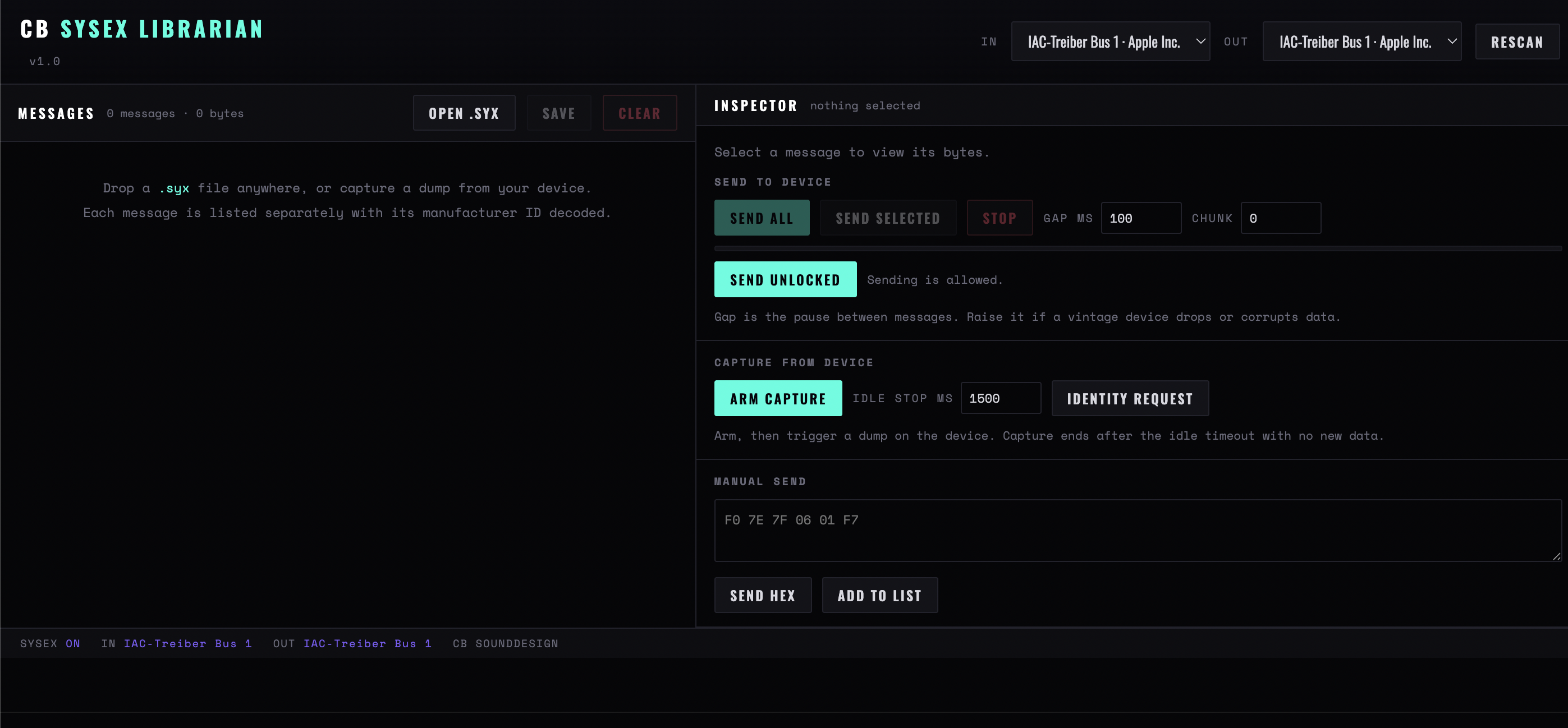
Figure 1 — Ports at the top, the message list on the left, and the inspector on the right with the send block, the capture block and the manual hex field
Chapter one
Ports and the list
In / Out
The ports for receiving and sending. Both are usually the same physical device, and both must be set — a capture with no input port silently collects nothing.
Rescan
Re-enumerates. — none — on either line means no port is selected, not that none exists.
Messages
The working list, with a count and a byte total. Every capture, every opened file and every manual send lands here.
Open .syx
Loads files from disk. Dropping .syx files onto the window does the same, several at once.
Save / .syx
Writes the list back out. This is the archive step, and the one to do before you experiment with sending anything.
Clear
Empties the list. It does not ask, and the list is the only copy unless you saved it.
Chapter two
The inspector
Select a message and its bytes are decoded as far as they can be. Most of what a SysEx message means is undocumented; what is here is the part that is universal.
Manufacturer
Decoded from the ID bytes, which are registered and therefore reliable. This tells you which device a mystery file came from even when the file name does not.
ID bytes
The raw identifier, for when the manufacturer is not in the table or has been reassigned.
Length
Byte count. The most useful single figure: two dumps from the same device and the same bank should be identical in length, and a short one is a truncated transfer.
Roland checksum
Validated where present. A failing checksum on a Roland dump means the file is corrupt — do not send it to hardware, because some devices will accept it and write it anyway.
Select a message to view its bytes
Nothing selected. The inspector is per-message, not a view of the whole list.
Chapter three
Capturing from a device
The safe half of the tool. Arm it, then tell the synth to dump.
Arm capture
Starts listening. Then trigger the dump from the device's own front panel — the librarian cannot ask for a bank, because the request differs for every make.
Idle stop ms
How long a silence ends the capture. Too short and a slow device's dump is split into fragments; too long and you wait. Two seconds suits most hardware.
Identity request
The one universal request: asks the device to say what it is. The first thing to try with unknown hardware, and a quick proof that the cable works in both directions.
Do this first, always
Before you send anything to a synth, capture what is already in it and save the file. Most SysEx bank sends overwrite the device's entire memory without a confirmation, and on older hardware there is no undo and no factory reset that restores anything but factory sounds.
Before you send anything to a synth, capture what is already in it and save the file. Most SysEx bank sends overwrite the device's entire memory without a confirmation, and on older hardware there is no undo and no factory reset that restores anything but factory sounds.
Chapter four
Sending to a device
The half that can destroy something. It is deliberately awkward.
Send unlocked
A lock that must be released before anything is transmitted. Sending is allowed is the unlocked state. It exists because a mis-sent bank is unrecoverable.
Send all / Send selected
The whole list, or one message. Selected is nearly always the right choice — sending a list you did not assemble yourself is how devices get overwritten.
Gap ms
The pause between messages. Old hardware needs the time to write to memory; too small a gap and the device drops the tail of a bank without reporting an error.
Chunk
How much is sent at once. Reduce it for devices that stall or corrupt on large transfers — a slow successful transfer is better than a fast failed one.
Stop
Aborts mid-send. The device is then in an unknown state: re-send the whole thing from the start rather than resuming.
Chapter five
Manual send
Send hex
Raw bytes, typed. For a single parameter change or a documented command, without building a file for it. The F0 and F7 wrapper is expected as part of what you type.
Add to list
Keeps the typed message so it can be saved with the rest. Useful for the two or three commands you end up sending repeatedly to a given device.
Chapter six
A working routine
- Identity request. Proves the cable, the ports and the permission, before anything matters.
- Arm, then dump from the device. Its whole memory, if it will send it.
- Check the length and the checksum. A short dump is a failed dump; capture it again before trusting it.
- Save the file, named for the device and the date. This is the backup. Everything after this is reversible only because of it.
- Unlock, then send one message. Confirm the device reacted as expected before sending a bank.
- Send the bank with a generous gap. Then re-capture and compare lengths: if the dump you get back matches the one you sent, the transfer worked.
CB Sounddesign · SysEx LibrarianOperator's manual · v1.0