CB Sounddesign
Editor · Librarian
Operator's manual · v1.0
Operator's manual · v1.0
CB Editor for Boss SDE-3000D
A full parameter editor for the Boss SDE-3000D delay, in a browser. The pedal has more parameters than its front panel comfortably reaches; this page lays all of them out, reads the current patch back off the device, and keeps a library of patches as files on your own disk.
Connect
Detect the pedal, live edit
Edit
Every parameter, on tabs
Keep
Read, compare, write, archive
Not the EVH document
This editor addresses the standard SDE-3000D parameter set. The EVH edition has its own arrangement, and this page says so where the two diverge. Parameters the editor has inferred rather than confirmed are marked with an asterisk — they work, but treat them as provisional.
This editor addresses the standard SDE-3000D parameter set. The EVH edition has its own arrangement, and this page says so where the two diverge. Parameters the editor has inferred rather than confirmed are marked with an asterisk — they work, but treat them as provisional.
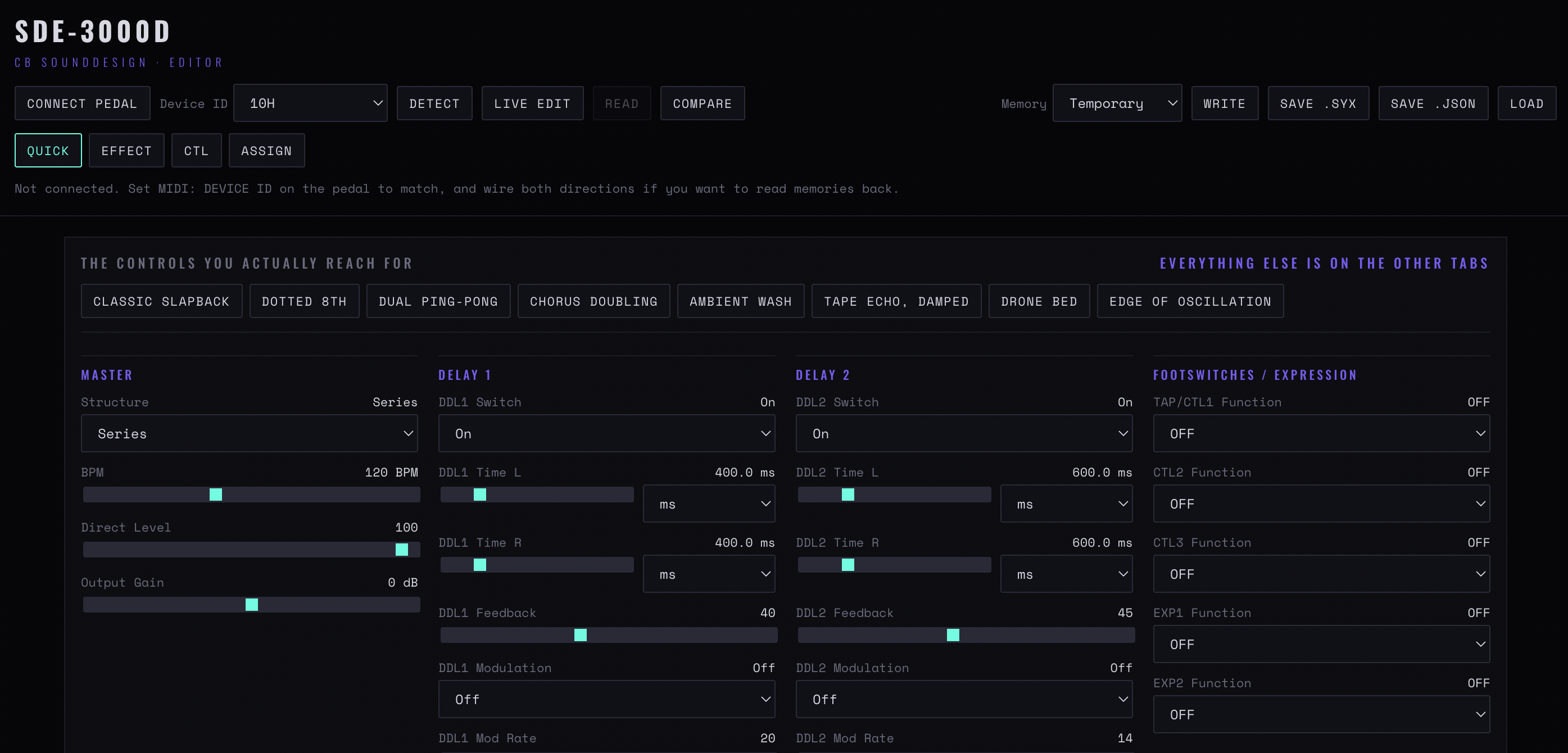
Figure 1 — The header with connect, device ID, detect, live edit, read, compare and the memory controls; the four tabs beneath; then the Quick tab with its eight starting points
Chapter one
Connecting
Connect pedal
Requests MIDI, including SysEx, which the editor needs to read and write parameters. Chrome, Edge or Brave, over HTTPS or localhost.
Detect
Sends an identity request and confirms the pedal is what it claims. Do this before editing — an editor talking to the wrong device sends valid messages that mean something else entirely.
Live edit
Sends each change as you make it, so the pedal follows the page. Turn it off to build a patch silently and send it in one go.
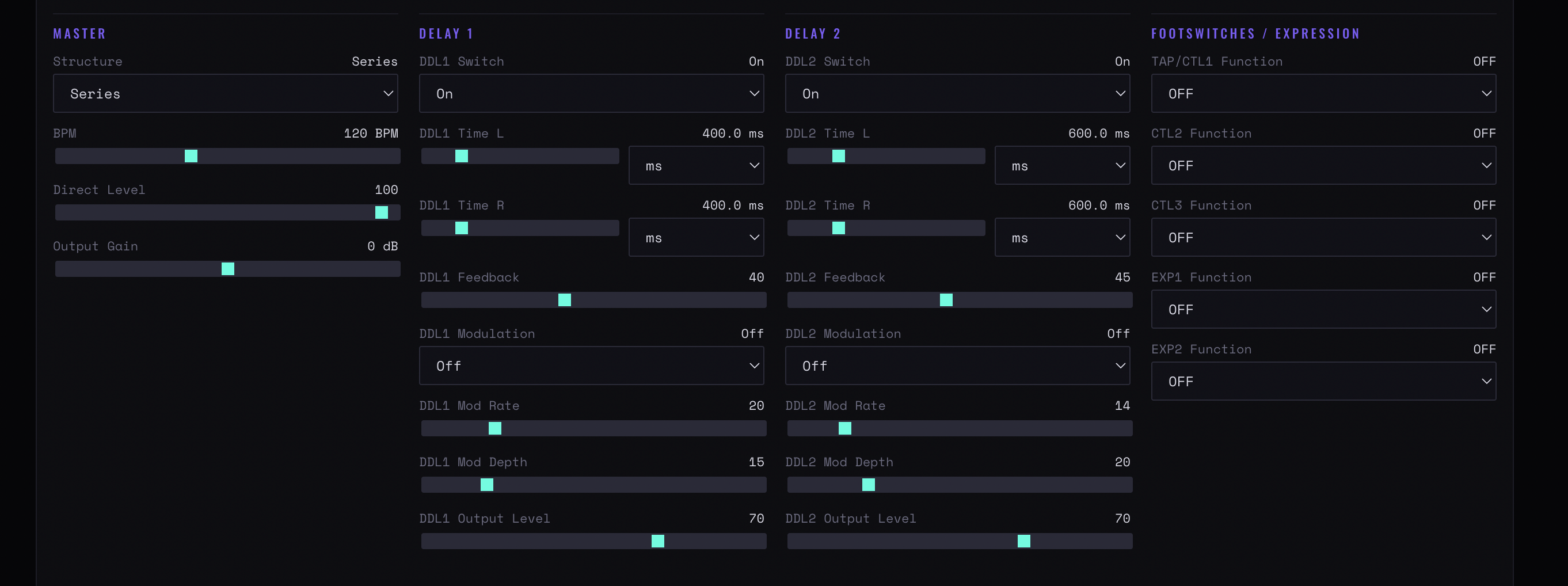
Figure 2 — The Quick tab’s four columns: master structure and levels, the two delay blocks with their time, feedback and modulation, and the footswitch and expression assignments
Chapter two
Editing
The parameters are grouped on tabs, with the ones you actually reach for on the first. Everything else is on the others — a deliberate split, because the full set is long and most of it is set once.
The first tab
Time, level, feedback and modulation: the controls that get moved while playing.
The other tabs
Everything the pedal can do, grouped by block. This is where the editor earns its place — several of these parameters are reachable on the hardware only through a menu sequence.
Inferred parameters
Marked with an asterisk. The device's implementation is not fully published; these were derived from its behaviour. They are safe to use and worth verifying against your ears rather than the label.
Chapter three
Patches
Reading, comparing and writing. The comparison step is the one that saves patches.
Read
Pulls the current patch off the pedal into the editor. The first thing to do with a sound you like on the hardware — before you touch anything on the page.
Compare
Shows the editor's state against the pedal's. The check before writing: it tells you exactly what is about to change, which a write on its own does not.
Memory / Write
The target slot and the commit. Writing overwrites the slot with no undo on the device — read and save the existing contents first if they matter.
Save .syx
The patch as system-exclusive data. The portable form, loadable by any SysEx tool including the CB SysEx Librarian, and the right format for archiving a pedal's memory.
Save .json
The same patch as readable text. For diffing two patches, for version control, and for reading a setting without a pedal to hand.
Load
Either format back into the editor. Loading does not write to the pedal — send it explicitly.
Back up before you explore
Read every slot you care about and save the files before using the editor in anger. The pedal has no patch history, and a write is immediate.
Read every slot you care about and save the files before using the editor in anger. The pedal has no patch history, and a write is immediate.
CB Sounddesign · SDE-3000D EditorOperator's manual · v1.0