CB Sounddesign
Dual-oscillator synthesizer
Operator's manual · v1.0
Operator's manual · v1.0
CB Paper Nest
A small dual-oscillator synthesizer with a CMOS-flavoured signal path, a biquad filter you can watch, and a touch surface. It is deliberately limited: two oscillators, one filter, one output stage, and an analysis panel that shows you what each control actually did.
Play
Keyboard, MIDI in, touch surface
Shape
CMOS drive, biquad filter, limiter
Watch
Transfer curve, waveform, spectrum
Start audio first
Browsers do not allow sound until you ask for it. Start audio is the first thing to press; until then the keyboard and the MIDI input are live but silent, which looks like a fault and is not.
Browsers do not allow sound until you ask for it. Start audio is the first thing to press; until then the keyboard and the MIDI input are live but silent, which looks like a fault and is not.
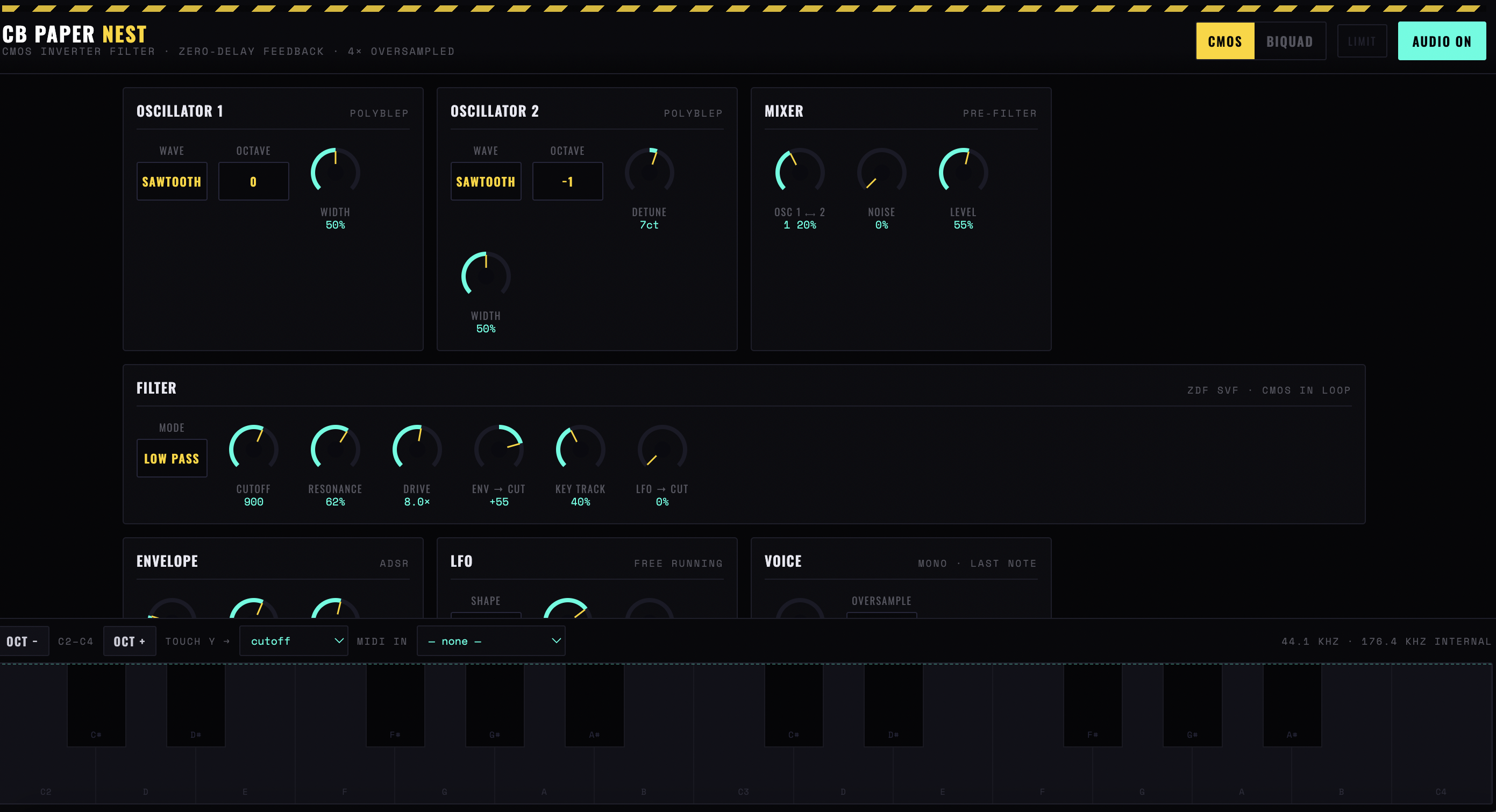
Figure 1 — The whole instrument: two oscillators into a mixer, the zero-delay filter with the CMOS stage in its loop, envelope, LFO and voice blocks, and the footer strip with the octave, touch and MIDI controls
Chapter one
The signal path
Three stages, in order, each with its own switch in the header: CMOS, BIQUAD, LIMIT. They are the whole synthesizer.
CMOS
The oscillator and drive stage. Named for the logic-chip character it produces — square-ish, abrupt, with harmonics that appear and vanish rather than fading. Pulse width is its main expressive control.
BIQUAD
The filter. A standard two-pole design, but with the transfer curve drawn live, so the relationship between cutoff, resonance and what you hear is visible rather than guessed.
LIMIT
The output stage. Not a mastering limiter — it is there because the CMOS stage can produce peaks that would otherwise clip the output, and it colours the sound when driven.
Chapter two
Playing it
Computer keyboard
Two octaves, C2 to C4 by default. Oct − and Oct + move the window; the label between them shows where you are.
MIDI in
A port picker. — none — means no port selected, — blocked — means permission was refused, — unsupported — means the browser has no Web MIDI at all — Safari, in practice.
Touch surface
The pad. X is always pitch; Y is assignable.
Touch Y →
What the vertical axis controls: nothing, cutoff, drive or pulse width. Cutoff is the obvious one and the least interesting; pulse width is where the CMOS character lives.
Chapter three
The analysis panel
Three displays, live. They are not decoration — this synth is small enough that watching it is a faster way to learn it than reading about it.
Filter transfer curve
What the biquad is doing to the spectrum right now, with the drive amount shown alongside. Resonance is visible as a peak; watch it rise as you turn the control and you will never overshoot it again.
Output waveform
The signal after the limiter. The moment the waveform flattens at the top, the limiter is working — which is a sound, not a fault, but it should be a choice.
Spectrum
Harmonic content. The useful view when setting pulse width: harmonics come and go in a pattern that is hard to hear and obvious to see.
Chapter four
Getting a sound out of it
- Start audio. Nothing works before this.
- CMOS on, biquad and limiter off. Play a note and listen to the raw oscillator. This is the character you are working with; everything downstream only removes from it.
- Set pulse width by eye. Watch the spectrum while you move it. Stop where the harmonic pattern is interesting rather than where the level is highest.
- Biquad on, cutoff low, resonance up. Find the resonant peak on the transfer curve, then bring cutoff up until the peak sits where the harmonics are.
- Assign touch Y to pulse width. Play the pad rather than the keyboard. This is what the instrument is for — the Y axis on pulse width is the expressive control the keyboard cannot give you.
- Limiter on last. With the waveform display visible, so you can see how hard it is working.
CB Sounddesign · Paper NestOperator's manual · v1.0