Ten generative MIDI instruments Operator's manual · v1.0
The Generative Suite
Ten browser instruments that generate MIDI rather than sound. Each takes a different generative idea — cellular automata, slime mould, drawn curves, step sequencing, rhythm algorithms, coupled pendulums, mechanisms, chaotic attractors, physical models — and points it at your hardware. They come in two generations: six on the first shell, four on a second, tighter one. Both share the same clock and the same habits, so learning any one teaches you most of the rest.
They make no sound
Every app is a MIDI source. Nothing is audible until an output port is selected and something on the other end is listening.
Requires
Web MIDI, over HTTPS or localhost — Chrome, Edge or Opera. Opened as a local file, MIDI is blocked: serve the folder with python3 -m http.server 8000 and open it from localhost.
Keep the tab in front
Browsers throttle timers in background tabs. Notes are scheduled ahead with timestamps, so brief interface hitches do not shift timing — but a backgrounded tab will stall.
The ten, in one line each
Automata
Conway's Game of Life as a step sequencer. A playhead sweeps the grid; living cells become notes and the grid rewrites itself as it plays.
Physarum
A slime mould colony that builds its own network. Probe rings read trail density where they sit and fire notes and CC.
Vector Path
A drawn arpeggiator. Trace a shape on four layers; a particle laps each path in time and plays what it passes over.
Sequencer Lab
The conventional one: eight drum tracks and a 303-style bass line, with per-step accent, probability, ratchet, nudge and slide.
Quadrivium
Six rhythm tracks, each driven by a different pattern algorithm, drawn as concentric rings. You steer patterns rather than draw them.
Harmonograph
Four pendulums drawing a figure, where each frequency ratio is both a rhythm and a musical interval — with just-intonation pitch bend.
Kinetic
A trigger machine with three mechanical engines: bouncing balls, weaving drafts, meshed gears. Rhythms that come from mechanism rather than from a grid.
Ricochet
A breakout sequencer. A ball works through a rack of bricks in beat time; the brick it hits chooses the note, and walls and paddle carry the percussion.
Flux
A modulation generator rather than a sequencer: chaotic attractors, orbiting bodies and a ripple tank, mapped onto eight controller lanes.
Fossil
A frozen event player. Earthquakes, tides, geysers, pulsars or your own CSV, stretched onto bars and looped as a fixed score.
How to read this manual Chapter one describes the shell the first six share — devices, transport, clock, save and load. Read it once; chapters two to seven then cover what is specific to each of those. Chapter eight describes the second shell used by the four newer apps, and chapters nine to twelve cover those. Chapter thirteen is about running several together, and chapter fourteen is what to do when something is silent.
Chapter one
The shared shell
Every app opens on the same permission gate, then shows the same two bars across the top: devices above, transport below. Beneath that, a large canvas and a control column on the right — except Sequencer Lab, which uses the full width for its step grids.
Draw cells on the grid. A playhead sweeps left to right playing whatever is alive in that column. Row sets pitch.
State
Generation148Population63Column6/16Statusstatic
Musical
C3Minor16×16
5
Figure 1 — The shared shell, here wearing Automata's canvas and side panel
1
Device row — output port, clock input, Rescan, and the JSON Save and Load.
2
Transport — Play and Panic. Space plays, and Panic never needs the transport stopped first.
3
Clock block — Source, tempo stepper, clock out, and each app's own rate control.
4
Canvas — the instrument itself, and in five of the six the main way you play it.
5
Side panel — a note explaining the instrument in three sentences, then its parameter groups.
Getting connected
Request MIDI access
The opening panel. Grant the browser prompt once and it is remembered for that origin. If the page is on file:, the panel says so and the button changes to Try anyway — which will fail; serve the folder instead.
Out
Where notes go. The first available port is picked automatically, which is often not the one you want — check it before wondering why nothing sounds.
Clock in
The port listened to for MIDI clock. Left at none deliberately — nothing is picked for you, because slaving to the wrong device is worse than not slaving at all.
Rescan
Re-reads the port lists after plugging something in. Ports also refresh by themselves on a device change, so this is a fallback.
Save / Load
A timestamped JSON file per app, holding everything that app considers state — patterns, parameters, channels, tempo. Nothing is stored in the browser: close the tab without saving and the patch is gone.
Transport and clock
Play
Space does the same. Starting resets the tick counter, so patterns always begin at the head. Stopping sends All Notes Off across all sixteen channels.
Panic
All Notes Off on every channel, immediately, whether or not the transport is running. Harmonograph also re-centres pitch bend. Reach for it whenever a note hangs.
Source
Internal runs the app's own clock at the tempo shown. External greys the tempo out and waits for MIDI clock on the chosen input: start, continue and stop all follow the incoming transport, and the tempo readout becomes a measurement of what is arriving. Switching source stops playback.
Tempo
20 to 300 BPM. The number is a readout; the arrows are the control — one BPM a press, ten with Shift held.
Clk out
Transmits 24 ppqn clock with start and stop on the output port, so hardware can follow the app. Only meaningful on internal clock — an app on external clock does not re-transmit.
Step / Sample / Div
Each app's rate control, named for what it does there: how often the sequencer advances, how often probes are read, how often a layer fires. The choices are always divisions of the beat.
How the timing works, and why it matters All six run a 24 ppqn tick and schedule notes roughly 120 ms ahead with explicit timestamps, checking every 25 ms for work to do. Interface stutter therefore does not become timing stutter — but it also means the last tenth of a second is already committed. A parameter change you make now lands just after the notes already in flight, which is why sweeping a control feels a beat behind at slow tempos.
Footer
Every app carries the same footer below the working area: the CB Sounddesign mark, info@cbsound.de, the legal links, and the build version — v1.0.0 at the time of writing. Quote that version in any bug report.
Chapter two
Automata — life sequencer
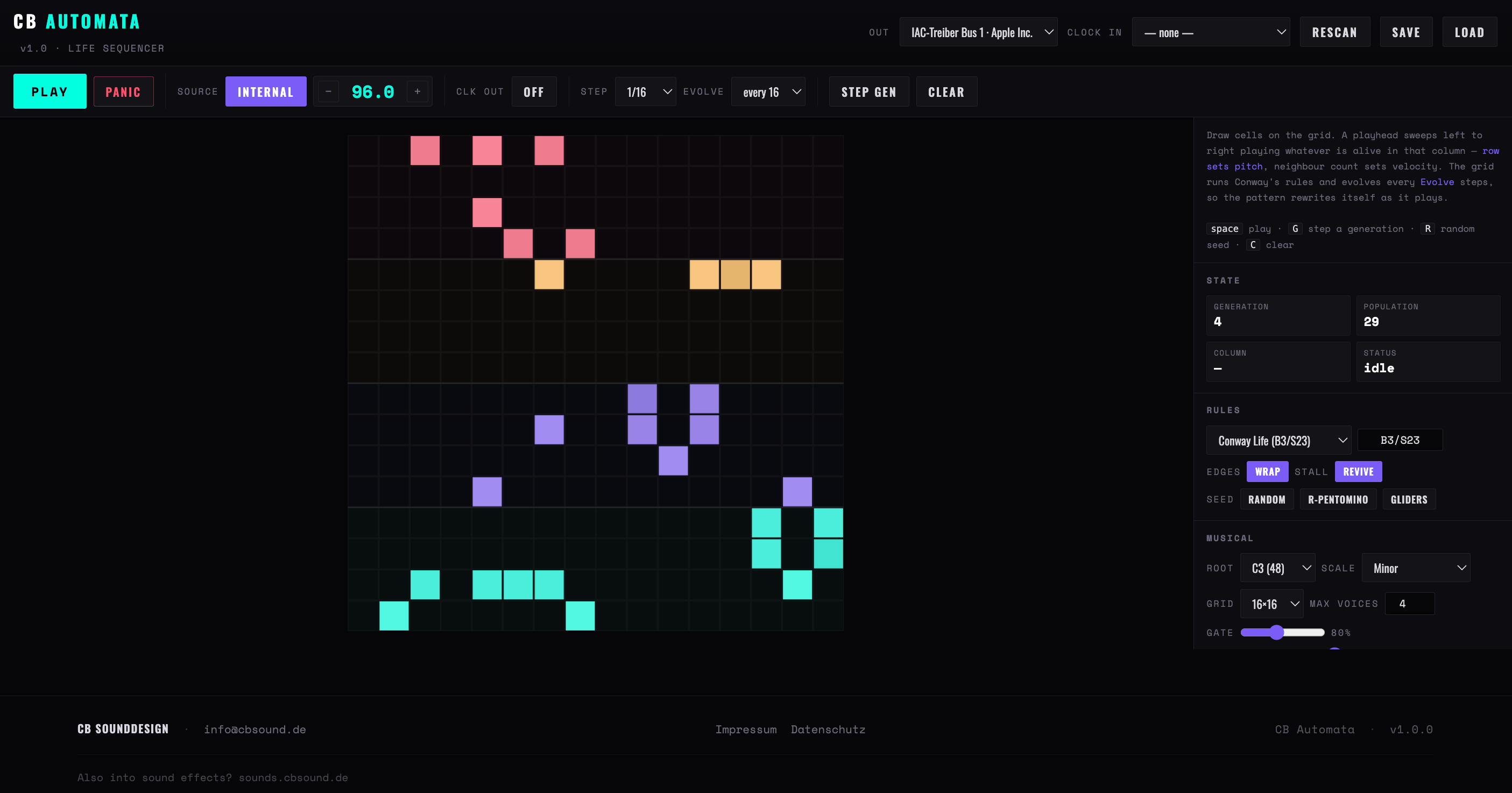
A square grid running Conway's Game of Life. A playhead sweeps left to right, one column per step, and plays whatever is alive in that column: the row sets the pitch, the number of living neighbours sets velocity and gate length. Every so many steps the grid takes a generation, so the pattern rewrites itself while it plays.
First pattern in six steps
Choose an Out port and set Root and Scale to something your receiving instrument will thank you for.
Draw on the grid — press and drag paints, and starting on a living cell erases instead.
Press Play. The playhead sweeps; the column readout follows it.
Set Evolve. At never the grid is a fixed sixteen-step pattern; at every 4 it is barely repeatable. Every 16 — one generation a bar — is the useful middle.
Set Max voices to taste. A dense column can have a dozen living cells; only the most crowded few are played.
Give each voice band its own MIDI channel to split registers across several instruments.
Rowpitch — top row is highest, one scale degree per row
Band tintwhich voice band, and so which MIDI channel
Pale columnthe playhead — cells in it flash white as they fire
Bright cellnewly born this generation; it dims as it survives
Outline onlydead cell — click to bring it to life
Neighboursnot drawn, but sets velocity and gate — crowded hits harder and holds longer
Figure 2 — Automata's grid, with four voice bands and the playhead on column three
Figure 3 — Automata itself, running Conway Life (B3/S23) on a 16×16 grid at 1/16 with Evolve set to every 16. Four voice bands on four channels, colour-coded by register
Transport extras
Step
1/4 down to 1/16, with 1/8 and 1/16 triplets. One column per step, so this and the grid size together set how long a lap takes.
Evolve
Never, or every 4, 8, 16, 32 or 64 steps. This is the single most consequential control in the app: it decides whether you have a loop or a process.
Step gen / Clear
Advance one generation by hand — G — or empty the grid. Both work while playing.
Rules, edges and seed buttons
Generation, population, column, status
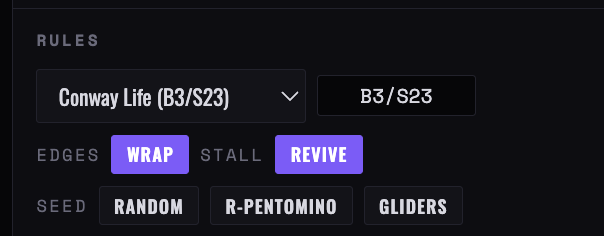
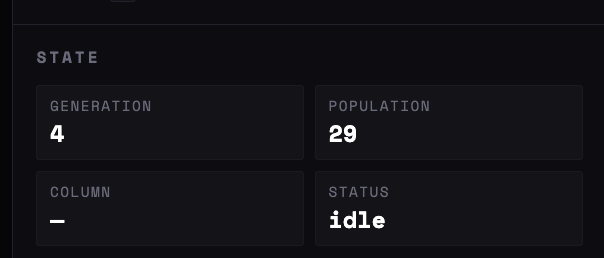
Figure 4 — Automata’s Rules block, with the edge behaviour and the three seed buttons, and the State block beside it — generation, population, current column and status. Watch the population for when the grid has gone extinct or static — the reading that decides whether Revive is doing any work
Rules
Preset
Nine named rules: Conway Life, HighLife, Day & Night, Maze, Mazectric, Seeds, Coral, 34 Life and Diamoeba. Maze and Coral grow slowly and hold their shape; Seeds is violent and never settles.
Rule string
Any rule in B3/S23 form — birth counts, then survival counts. Anything else is rejected and the field reverts.
Edges
Wrap joins the edges into a torus, so gliders come back round. Hard treats the border as dead ground, which kills travelling patterns at the wall.
Stall
Life reliably dies out or freezes into still lifes. With Revive on, the app watches for that — the Status readout shows extinct or static — and sprinkles new cells in rather than letting the sequencer go quiet. Ignore lets it die, which is the honest setting if you want the pattern to end.
Seeds
Random fills about a quarter of the grid. R-pentomino is five cells that stay chaotic for over a thousand generations — the best starting point for long runs. Gliders places four travelling patterns in the corners, which only keeps moving with Wrap on.
Musical
Root / Scale
Every note from C0 to C6 as the root, and nine scales. The grid is mapped one scale degree per row from the bottom up, so a sixteen-row grid on a pentatonic covers three octaves and on the chromatic scale barely one.
Grid
8, 12, 16, 24 or 32 squares. Resizing keeps what fits in the corner and discards the rest. Larger grids give longer laps and wider range at once.
Max voices
1 to 12 notes per column. When more cells are alive than that, the ones with the most neighbours win — so the app plays the dense cores of a pattern and drops its stragglers.
Gate
10 to 180 per cent of a step, as the baseline note length.
Gate spread
How much the neighbour count stretches or shrinks that length. At zero every note is the same; high up, isolated cells are staccato and crowded ones sustain across several steps. This is what makes a Life pattern breathe rather than tick.
Voice bands
One to four horizontal bands, each with a MIDI channel and a note range shown beside it. Four bands on four channels turns one grid into a four-part arrangement split by register.
A setting that works R-pentomino seed, Conway rules, Wrap on, 24×24 grid at 1/16, Evolve every 16, Max voices 3, Gate 60 with spread high, four bands across four channels. It will play for twenty minutes without repeating and without wandering out of key.
Chapter three
Physarum — slime network
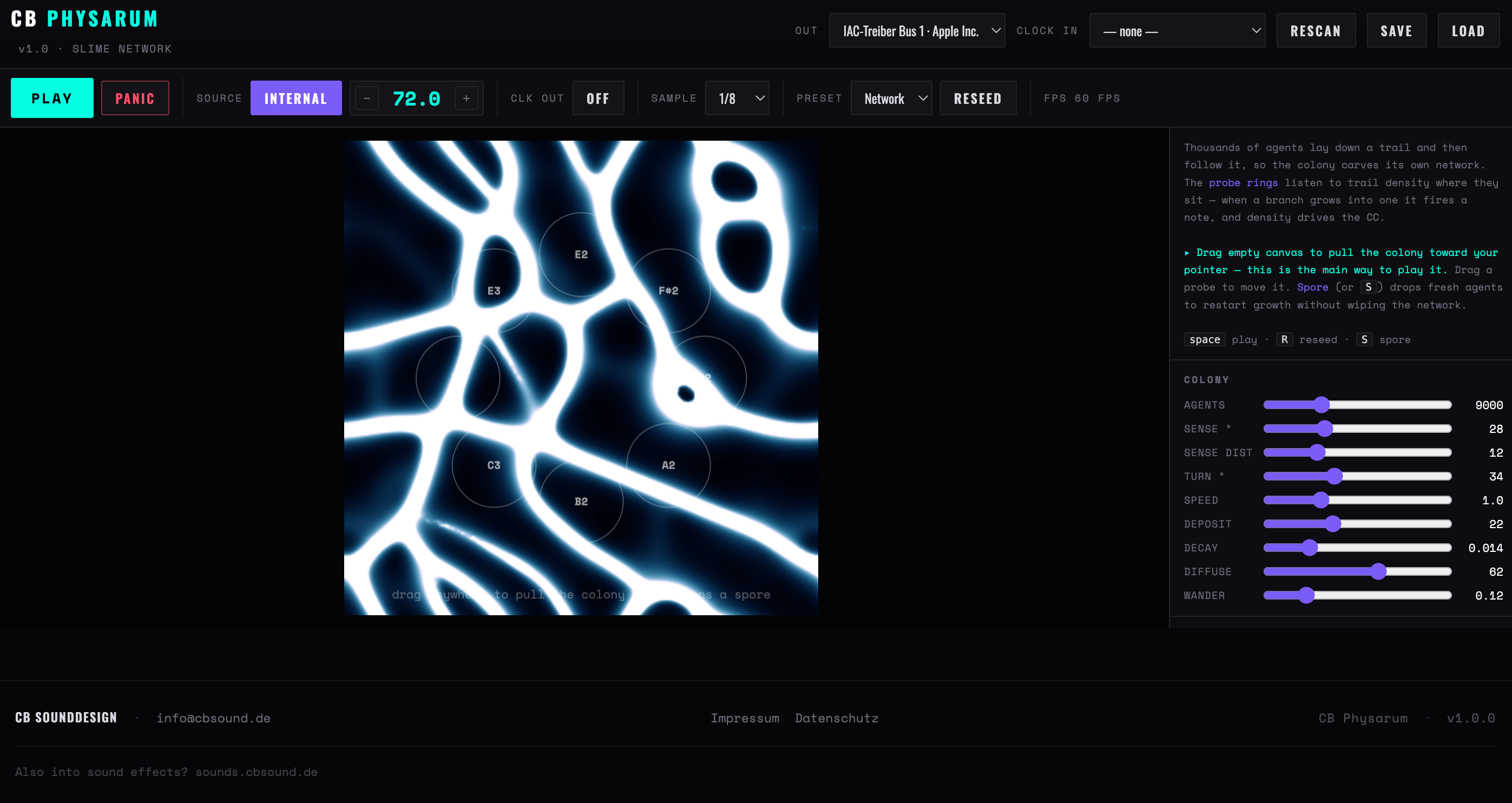
Thousands of agents each lay down a chemical trail and then steer towards the strongest trail they can smell. Out of that alone, the colony carves a network of filaments that constantly rebuilds itself. Nothing in the simulation knows about music: the sound comes from probes — rings placed on the field that measure trail density underneath them, fire a note when a branch grows into them, and send that density as a controller.
First sound in five steps
Pick an Out port and press Play. Nothing may fire yet — the colony needs a few seconds to build structure.
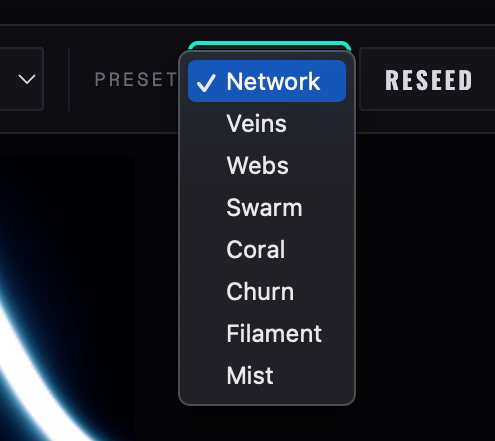
Choose a Preset. Network and Veins build clean filaments; Swarm and Churn stay agitated; Mist barely holds a shape.
Drag on empty canvas. The colony bends towards your pointer — this is the main way to play it.
Raise or lower Threshold until probes fire at a rate you like, and set Trigger to suit: Growth only for sparse events, Sustained for a pulse while covered.
Drag individual probes onto branches you want to hear, and turn CC on to send density as continuous control.
Violet hazethin trail — agents have passed, nothing settled
Bright corean established filament — this is what triggers probes
Filled ringprobe above threshold; the arc shows how full it is
Grey ringprobe below threshold — silent, still sending CC
Ring labelthe note that probe plays, fixed by its index in the scale
White flashthe moment it fired
Figure 5 — Three probes on a colony, one of them covered
Figure 6 — Physarum on the Network preset — 9000 agents, eight probes at 1/8, Sustained trigger. The bright filaments are what the probes are listening for
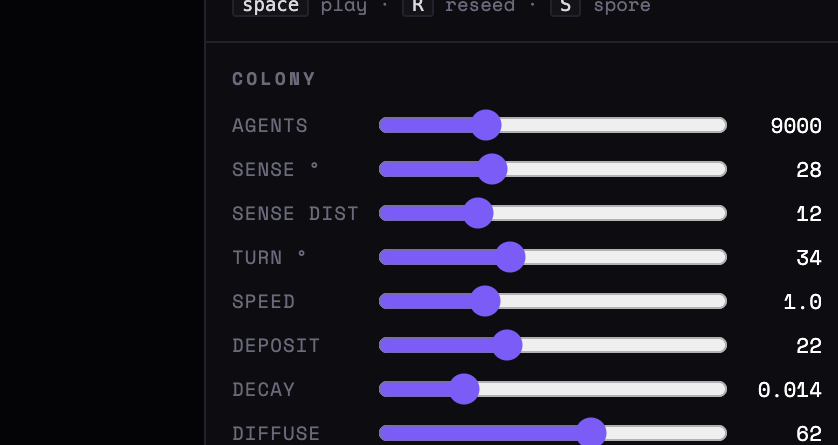
The nine colony controls
The eight presets
Figure 7 — Physarum’s Colony block at readable size: the nine controls that shape how the network grows, from agent count down to wander
Colony
Nine parameters govern the simulation. They interact strongly — change one at a time, and use the presets as landmarks to return to.
Agents
500 to 30,000. More agents means denser, more stable structure and a heavier frame rate — watch the FPS readout in the transport row.
Sense ° / dist
How wide apart and how far ahead each agent's three sensors sit. Narrow and far gives long straight veins; wide and near gives tangled webs.
Turn °
How sharply an agent may steer per step. Low values make lazy curves; high values make the colony jitter into knots.
Speed
Distance covered per step. Fast agents outrun their own trail, which thins the network.
Deposit / Decay
How much trail is laid, and how quickly it evaporates. These two are the balance the whole thing hangs on: deposit high with decay low silts the field up until everything is equally dense and the probes stop distinguishing anything.
Diffuse
How far trail bleeds sideways each frame. High diffusion makes soft wide channels; low keeps hairline filaments.
Wander
Random jitter added to every heading. A little keeps the colony from locking into rigid spokes; a lot dissolves it into fog.
Reseed / Spore
Reseed scatters every agent and wipes the trail — a clean start. Spore (or S) drops a fresh cluster of agents somewhere without wiping the network, restarting growth inside what you already have.
Probes
Count
1 to 16. Each probe's index sets its note — probe one is the root, probe two the second scale degree, and so on up. Adding probes therefore extends the range upwards.
Ring / Grid
Two layouts. Ring puts probes in a circle — good with radial colonies; Grid spreads them evenly, which catches more of a wandering network. Either can then be dragged about by hand.
Radius
How much field each probe averages over. Wide probes read slow, smooth changes; narrow probes are twitchy and precise.
Threshold
Measured as a share of the colony's own peak density, not an absolute level — so it keeps meaning the same thing when you change preset. Low fires almost constantly; high waits for the main trunk to arrive.
Trigger
Growth only fires when a probe crosses upward — sparse, event-like. Both edges also fires when the branch leaves. Change fires on any significant movement in either direction. Sustained fires on every sample while the probe stays covered, giving repeated notes — the busiest of the four.
CC on
Every probe sends its density as a controller on every sample, whether or not it fires a note — probe one on the CC base, probe two on the next number up, and so on. Useful even with no notes at all: eight probes become eight slow modulation sources.
Sample
In the transport row: how often probes are read, from one bar down to 1/16. This is the app's step rate — slower sampling turns the colony into pads, faster into arpeggios.
Voices / Retrig
How many probes may fire on one sample — the densest win — and how many samples a probe must wait before firing again. Retrig is the difference between a texture and a machine gun.
Gate
10 to 400 per cent of a sample interval. Above 100 notes overlap, which is where the app sounds like a chord instrument rather than a sequencer.
Playing it, rather than watching it Set Sample to 1/8, Trigger to Growth only, Retrig 4, Voices 2, and eight probes in a ring. Then drag: pulling the colony across the ring plays it like a bowed instrument, and letting go lets the network relax back into whatever it was building. Spore is the percussive gesture — it starts a new branch that will reach a probe a few seconds later.
Chapter four
Vector Path — drawn arpeggiator
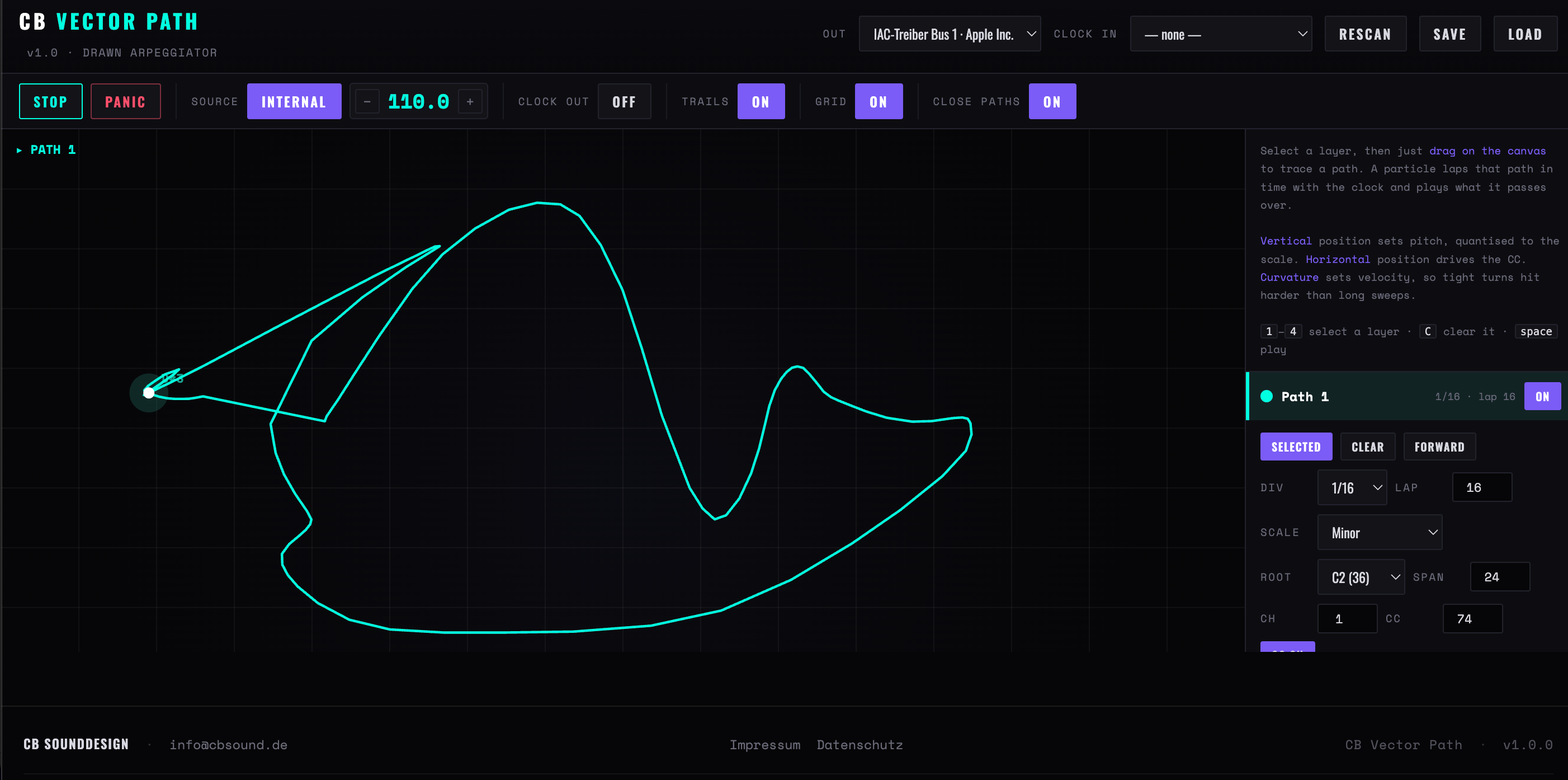
Four layers, each holding one drawn path. A particle laps its path in step with the clock and plays whatever it passes over: height sets pitch, quantised to the layer's scale; horizontal position drives the controller; and the curvature of the line at that point sets velocity, so tight corners hit harder than long sweeps.
First line in five steps
Pick an Out port. The label at the top left of the canvas always says which layer a drag will draw into.
Drag a shape. A loop gives a repeating figure; a line gives a shape that reads forwards then backwards.
Press Play. The particle appears and the note name flashes beside it as each note fires.
Set Lap — how many steps one circuit takes — and Div, the step rate. Together they set how fast the shape is read.
Press 2 and draw a second layer on a different channel, with a different Lap. Two paths at 16 and 12 steps drift against each other indefinitely.
Verticalpitch — top of the canvas is the top of the span
Horizontalthe CC value, 0 at the left edge to 127 at the right
Curvaturevelocity, and gate length if Gate curve is up
Dim pathanother layer — bright is the selected one
Dashed borderthe selected layer is empty — drag to draw
Gridtwelve rows and sixteen columns, as a drawing guide only
Figure 8 — One closed path with the particle at the top of its arc
Figure 9 — Vector Path with one open figure drawn on layer 1: 1/16 division, sixteen-step lap, C2 minor over a two-octave span
Drawing
Drag
Replaces the selected layer's path — there is no adding to an existing one. Redrawing also switches that layer on.
Close paths
On, the end of a drag is joined back to its start, so the particle loops seamlessly. Off, the path stays open and the particle bounces along it — out and back — rather than snapping from end to start.
Constant speed
The particle moves by arc length, not by drawn point, so a section you scribbled slowly is not read more slowly. Draw at whatever pace suits you.
Grid / Trails
Display only. Neither affects what is played.
Per layer
Select / On
Clicking a layer's header selects it for drawing; 1–4 does the same. On is separate: a layer can play while another is being drawn.
Div / Lap
The step rate, 1/4 to 1/32 with triplets, and how many steps one lap takes, 2 to 128. Lap is the musical length of the figure; Div is how finely it is sampled.
Forward / Reverse
Direction of travel. Reversing a closed path is a genuinely different melody, not the same one backwards, because velocity follows curvature rather than order.
Root / Span / Scale
The bottom note, how many semitones the canvas height covers (5 to 48), and the scale everything snaps to. A small span makes the shape read as ornament; a wide one makes it read as melody.
Ch / CC
Channel and controller number, with CC switchable per layer. Four layers on four channels and four controllers is the app's natural configuration.
Gate / Gate curve
Note length as a share of a step, and how much curvature bends it. With Gate curve up, straight runs sustain and corners clip short — the single control that makes a drawn line phrase.
Phase
Where on the path this layer starts, 0 to 99 per cent. Two layers on the same shape at different phases play a canon.
Clear
Empties the path but keeps every setting. C clears the selected layer.
Chapter five
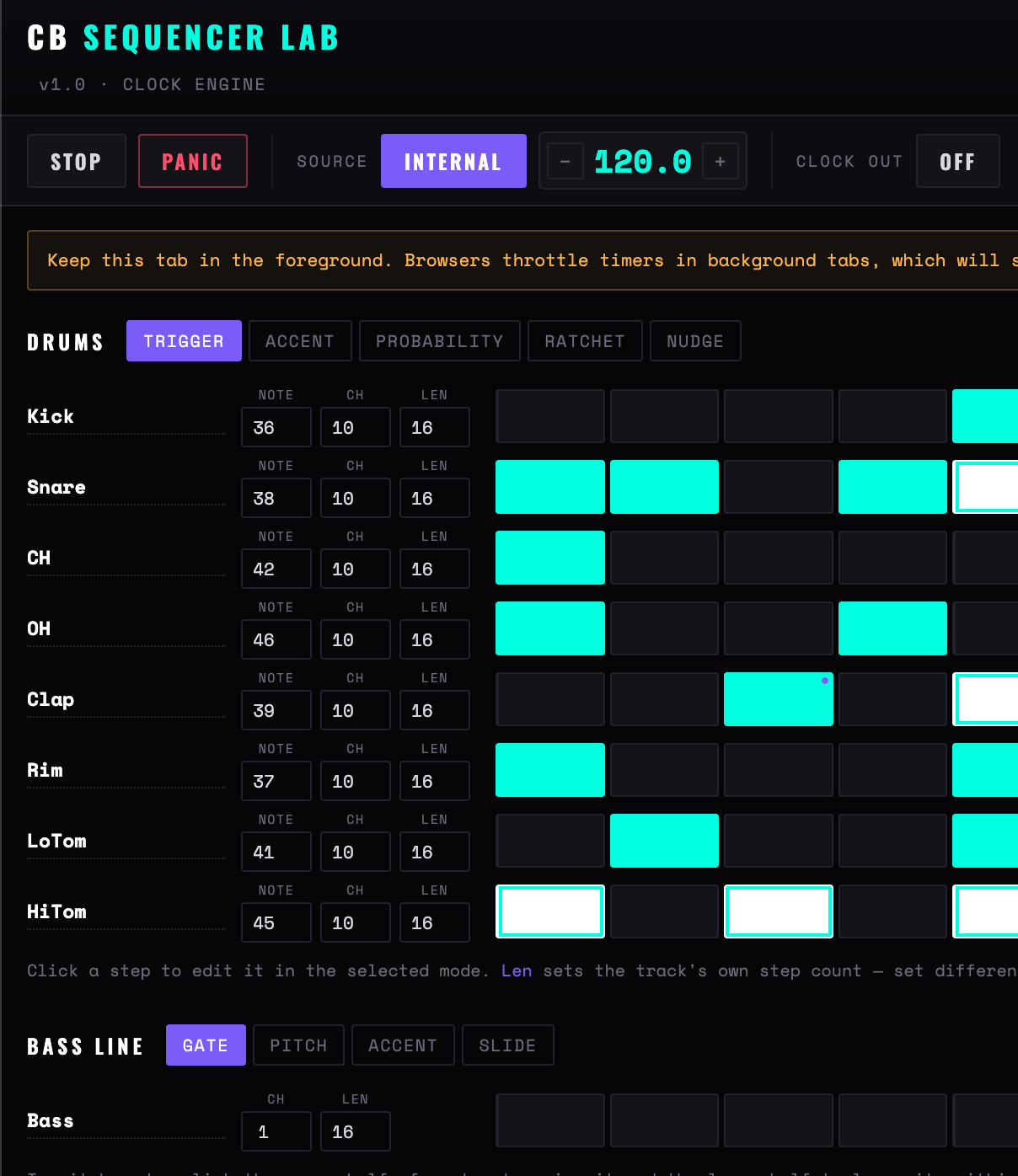
Sequencer Lab — clock engine
The conventional instrument of the set, and the one to reach for when you know what you want to hear: eight drum tracks and one bass line, sixteen steps each, edited through a mode switch rather than a menu. It is also the reference implementation of the clock the other five use — the jitter readout is here because this is the app you slave to a drum machine to find out whether its clock is any good.
TriggerAccentProbabilityRatchetNudge
Kick36ch 10len 16
Bassch 1len 16C2Eb2G2C3Bb2G2
step onplayheadaccentratchetprobability below 100beyond this track's lengthslide
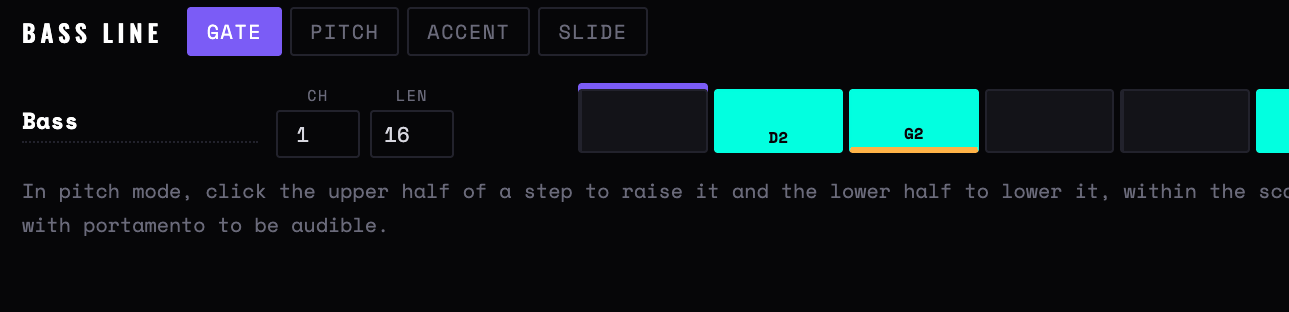
Figure 10 — One drum track and the bass line, with Trigger mode selected
Figure 11 — Sequencer Lab in Trigger mode — the first half of the grid. White steps are accented, the violet column is the playhead, and every track carries its own note, channel and length
Drums
Modes
The five buttons decide what clicking a step does. Only Trigger switches steps on and off; the other four edit a step that is already on, so a click that seems to do nothing usually means the step is off.
Accent
Two velocities per track: 88 normally, 118 accented. Deliberately blunt — it is a step sequencer, not a piano roll.
Probability
Cycles 100, 75, 50, 25 per cent. Rolled fresh every pass, so a handful of steps below 100 stops a sixteen-step loop repeating itself exactly.
Ratchet
One to four retriggers inside the step, dividing it evenly, each a little quieter than the last.
Nudge
Cycles the step through ±15 ms in five-millisecond moves — micro-timing, applied on top of swing. Pushing a snare five milliseconds late across a whole pattern is the difference between programmed and played.
Note / Ch / Len
Per track. Len is the track's own step count, 1 to 16 — set different lengths and the tracks drift against each other, which is where polymeter comes from. Steps past the length are drawn hollow and never fire.
Density / Randomise
The dice on a row rewrites that track; Randomise all does all eight. Density sets how busy the result is, and downbeats are weighted higher than off-beats, so the output is a pattern rather than noise. Accents, the odd probability and the occasional ratchet come along with it.
Defaults
Eight tracks on channel 10 at General MIDI drum notes — kick 36, snare 38, closed hat 42, open hat 46, clap 39, rim 37, low tom 41, high tom 45. Rename and renumber freely; the names are labels only.
Figure 12 — The first eight steps of the bass line in Pitch mode — click the upper half of a step to raise it a scale degree, the lower half to lower it. The orange underline marks a slide
Bass line
Gate / Pitch
Gate mode switches steps on and off. In Pitch mode, clicking the upper half of a step raises it a scale degree and the lower half lowers it — so a line is written by pushing steps up and down rather than by choosing notes. The note name is drawn in each step.
Accent
Velocity 120 rather than 92.
Slide
Lengthens the note past the end of its step so the next one overlaps it — the classic 303 behaviour. It only sounds like a slide on a monophonic synth with portamento switched on; on a polyphonic patch you will hear two notes instead.
Root / Scale
Root from C1 to C4, eight scales including Blues. Changing scale re-reads the existing degrees, so a written line transposes into the new mode rather than breaking.
Timing readouts
Swing
0 to 70 per cent, pushing odd-numbered steps later by a share of half a step. Applied per track against that track's own length.
Bar / beat lamps
Bar count and four beat lamps, driven from the same tick as the notes — so if the lamps stutter, the timing genuinely stuttered.
Jitter
On external clock only: the standard deviation of incoming clock intervals, with the worst single deviation in the window beside it. Under about 0.5 ms is a solid clock; a peak several times the average means one device is sending bursts.
Footer
Output port, clock source and the current step number — the quickest confirmation that the app is actually running and pointed somewhere.
Chapter six
Quadrivium — polyrhythm engine
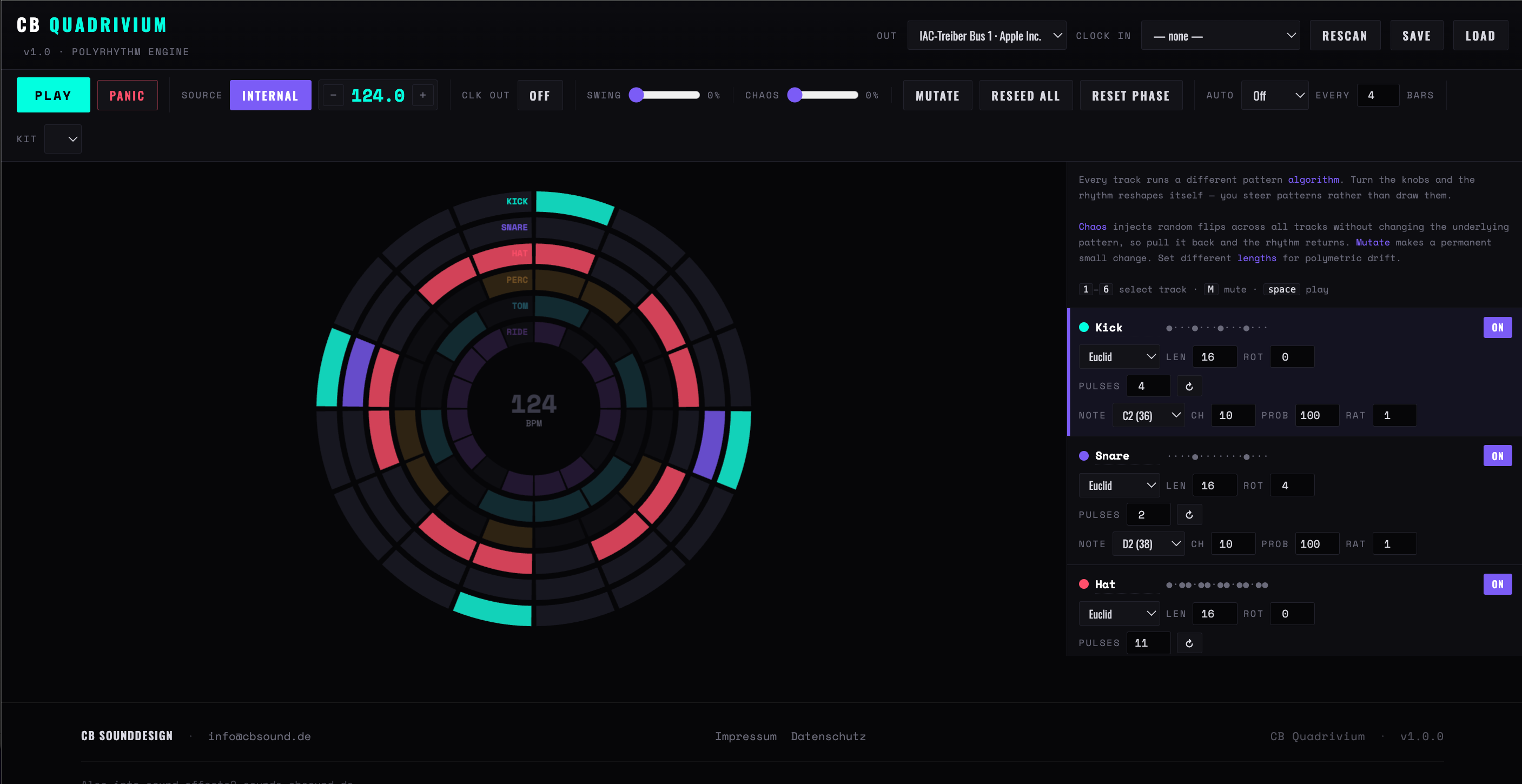
Six rhythm tracks, drawn as concentric rings, each generated by a different algorithm. There are no steps to draw: you choose an engine, turn its two parameters, and steer the pattern that comes out. Because each track has its own length, the combined cycle is usually far longer than a bar — the centre of the display tells you how long.
Outer ringtrack one; each ring inward is the next track
Segment countthat track's length — rings need not match
Filled segmenta hit; dark segments are rests
Faded ringthe track is switched off
Radial lineplayhead, following track one
Centretempo, and how many steps before everything lines up again
Figure 13 — Four active tracks at three different lengths
Figure 14 — Quadrivium with six rings: Kick and Snare on Euclid, Hat on eleven pulses in sixteen, and the combined tempo at the centre
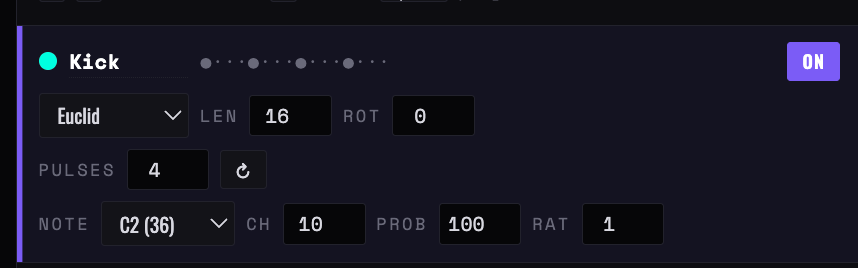
One track: engine, length, rotation
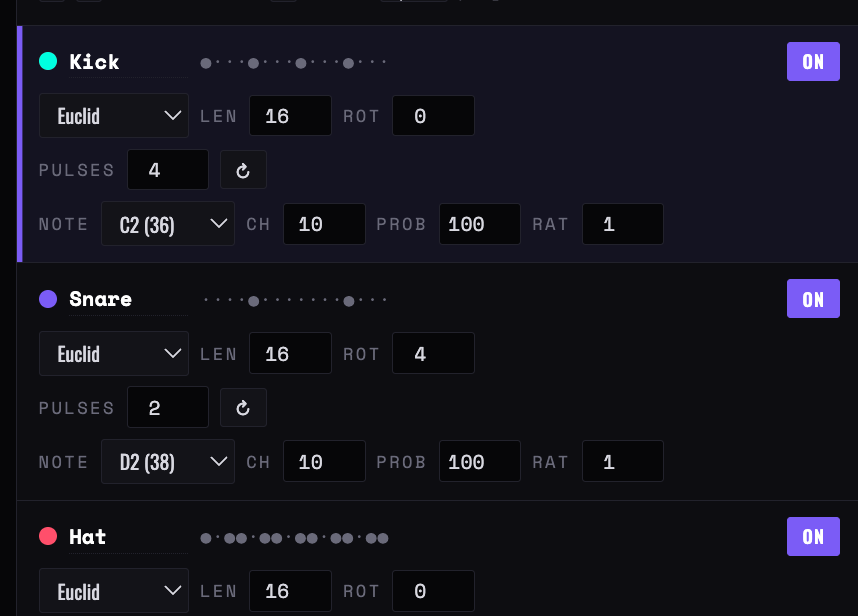
Three tracks, all on Euclid
Figure 15 — A Quadrivium track close up, and the first three tracks below it: the engine menu with its length and rotation, the pulse count and its reseed button, then note, channel, probability and ratchet
The six engines
Each engine exposes two numbers, labelled for what they mean there, plus rotation and length which work the same everywhere.
Euclid
Spreads a number of pulses as evenly as possible across the length. Four in sixteen is four-on-the-floor; five in sixteen is a clave; eleven in sixteen is a hat pattern. The most predictable engine and the best starting point.
Prime
Two prime cycles beating against each other, with a binary seed punching extra holes. Small parameter changes give large rhythmic jumps — good for finding something you would not have written.
Divider
A clock divider: fires every n steps. With rotation it walks. The one engine that is entirely predictable, which makes it the right choice for a part that must stay put.
Knight
A marker hops a four-by-four board in chess-knight moves and fires whenever it lands on a lit square. Squares — how many of the sixteen are lit — is the real density control; Move changes the tour. Patterns are reproducible from the seed.
Logistic
The logistic map, thresholded. Low R settles into short repeating cycles; past about three-fifths of the range it turns chaotic and stops repeating. Thresh sets how much of the orbit counts as a hit, so it is the density.
Density map
Smooth procedural terrain sampled at an X/Y position, with Dens as the waterline — raise it and more of the map pokes through as hits. Downbeats are weighted, so it stays musical as it fills. Moving X and Y is like walking across a landscape of rhythms.
Per track
Len / Rot
Length 1 to 32 steps, rotation ±32. Rotation applies after the engine has generated the pattern, so it moves the accents without changing the rhythm's shape. Mixed lengths are the whole point — the centre readout shows the combined cycle.
Pattern strip
The dots-and-circles line in each track header is the pattern as text — the fastest way to compare two tracks without reading the rings.
Note / Ch
One note per track, chosen by name. Six tracks default to channel 10 at drum notes, but nothing stops a track playing a bass note on its own channel.
Prob / Rat
Per-track probability and one to four retriggers per hit — the same idea as Sequencer Lab, applied to the whole track rather than to single steps.
Dice
New seed, plus sensible new values for whichever engine the track is on. The quickest way to audition an engine.
Global
Chaos
Randomly flips steps as they play, across all tracks, without touching the stored patterns — so it is fully reversible. Pull it back to zero and the rhythm returns exactly as it was. The one control to put a hand on during a take.
Mutate
One small permanent change to the selected track — a pulse added or removed, or a new seed, and sometimes a rotation. Not reversible; save first if the pattern matters.
Reseed all
New parameters for every track at once. A whole new rhythm, keeping the lengths, notes and channels you set up.
Auto
Mutate or reseed automatically every so many bars, 1 to 64. Mutate every four bars is a slow evolution; reseed every eight is a structure that keeps changing section.
Reset phase
Sends every track back to step one without stopping. The way to realign a polymetric drift once it has gone somewhere you cannot follow.
Kit
Present in the transport row but empty in this version — it does nothing yet. Set notes per track instead.
Chapter seven
Harmonograph — ratio engine
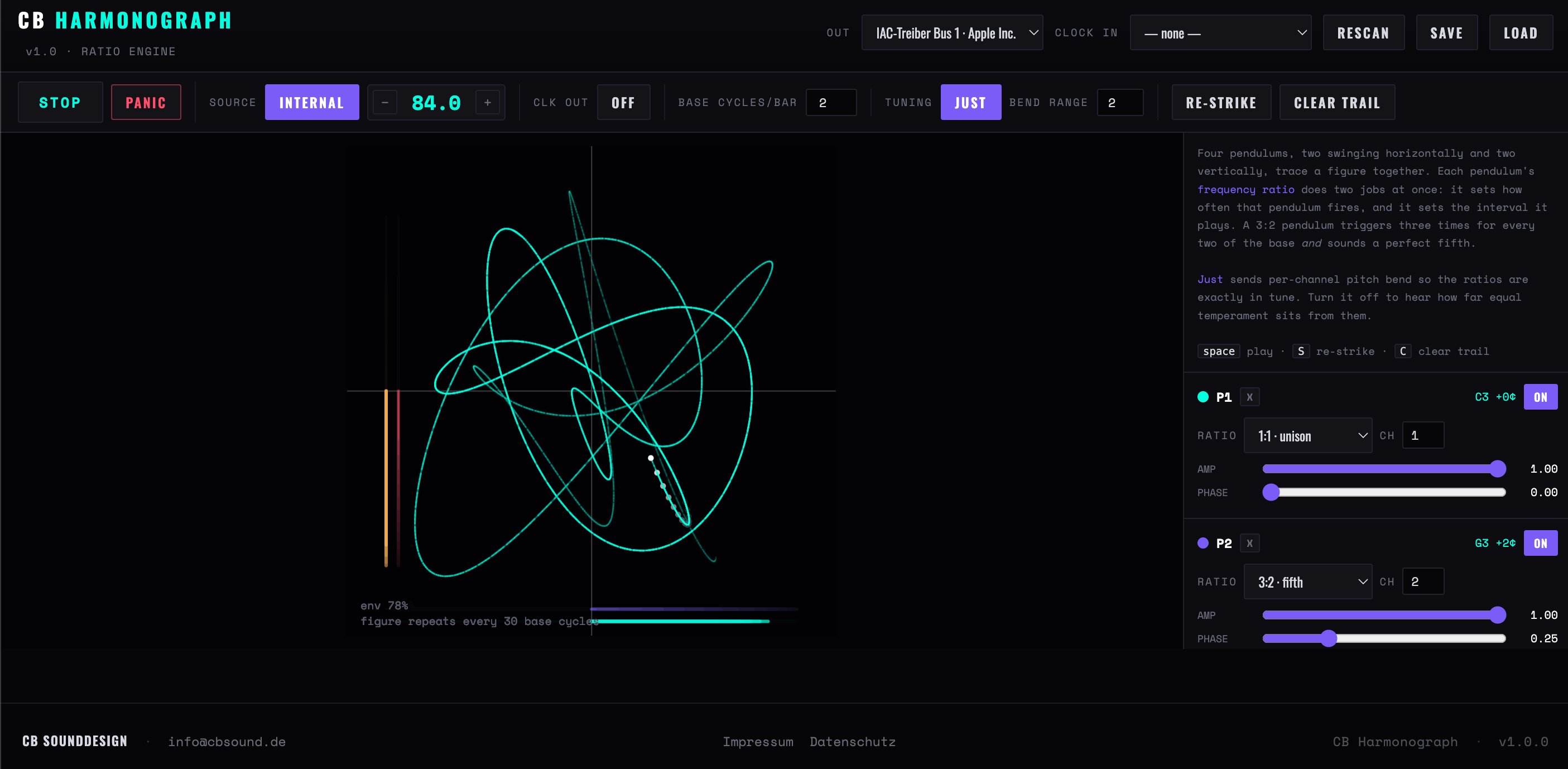
Four pendulums, two swinging horizontally and two vertically, drawing a figure together. Each pendulum's frequency ratio does two jobs at once: it sets how often that pendulum fires a note, and it is the interval that note plays. A pendulum at three to two triggers three times for every two of the base and sounds a perfect fifth. Rhythm and harmony are the same number — that is the whole idea.
Bright tracethe last few bars; it fades as the envelope decays
White dotthe drawing head — its X and Y are the two CCs
Bottom barsthe two X pendulums, swinging left and right
Left barsthe two Y pendulums; a bar thickens as its note fires
envhow far the swing has decayed since the last strike
repeats everybase cycles before the figure — and the phrase — closes
Figure 16 — A four-pendulum figure part way through its decay
Figure 17 — Harmonograph with Just tuning on: P1 at unison on C3, P2 a 3:2 fifth on G3 at +2 cents, the figure repeating every thirty base cycles
Per pendulum
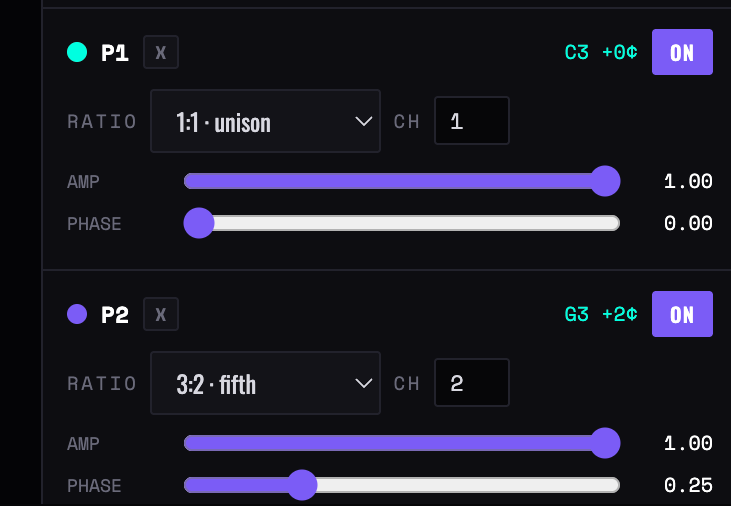
Ratio
Seventeen ratios from unison to two octaves, each named by its interval. The header shows the note it produces and how many cents that sits from equal temperament.
Axis
X or Y. The figure needs at least one of each to be a figure rather than a line — all four on one axis draws a horizontal smear.
Ch
One channel per pendulum, because just intonation is delivered as per-channel pitch bend. Four pendulums sharing a channel cannot each be bent separately.
Amp
How far that pendulum swings — its share of the figure, and of the CC range on its axis.
Phase
Where in its swing it starts. Phase is what turns a circle into a rose or a lens: two pendulums at the same ratio a quarter-cycle apart draw a circle, in phase they draw a diagonal line.
P1 and P2, with cents deviation
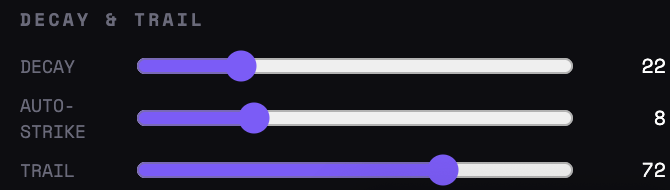
Decay, auto-strike and trail
Figure 18 — Two pendulums as the app shows them — ratio, axis, channel, amplitude and phase, with the cents deviation from equal temperament printed on the right: 3:2 sits at +2
Tuning
Just
On, each pendulum's note is nudged into exact tune with a pitch-bend message on its own channel before the note is sent. Off, everything is rounded to the nearest semitone and you hear how far equal temperament sits from the ratios — which is the point of the switch.
Bend range
Must match the receiving synth's own bend range in semitones, or the tuning will be wrong by exactly the ratio of the two. Two semitones is the usual default. This is the single most common cause of Harmonograph sounding out of tune.
Root / Gate
The note a unison pendulum plays, and note length as a percentage of that pendulum's own cycle — so fast pendulums get short notes automatically.
CC X / CC Y / Ch
The drawing head's coordinates as two controllers, sent eight times a beat. With notes switched off entirely this is still useful: a harmonograph is an excellent two-axis modulation source.
3:2 fifth
+2 cents from equal temperament
5:4 major 3rd
−14 cents
6:5 minor 3rd
+16 cents
5:3 major 6th
−16 cents
7:5 tritone
−17 cents
7:4 harmonic 7th
−31 cents — the most audibly foreign of the set
Motion
Base cycles/bar
How many swings a unison pendulum makes per bar — the master rate everything else multiplies. Two is a good default; raise it and the whole instrument becomes an arpeggiator.
Decay
How fast the swing dies away, which is also how fast velocities fall — a real harmonograph loses energy, and so does this. At zero it runs forever at full strength.
Re-strike / Auto-strike
Restores full amplitude and clears the trace. Automatically every 1 to 32 bars, or by hand with S. Auto-strike every eight bars against a moderate decay gives a phrase that swells and fades in eight-bar units.
Drift
Detunes each pendulum by a few cents' worth of frequency, deterministically. Real pendulums are never at exact ratios, which is why real harmonograph figures precess and never quite close. A little drift is the difference between a diagram and an instrument.
Kick
Nudges amplitudes and phases at every automatic re-strike, so successive phrases are related rather than identical.
Perturb
One immediate random shove to every pendulum's amplitude and phase. Use it when a figure has gone symmetrical and dull.
Trail
How long the drawing persists. Display only — but a long trail is how you read whether the figure is closing or precessing.
Presets
Six four-pendulum configurations: Fifth & octave, Major triad, Minor triad, Septimal, Rose and Wide drift. Each sets all four ratios and axes at once; the triads are the ones to start with, since they sound like harmony rather than like mathematics.
Chapter eight
The second shell
Kinetic, Ricochet, Flux and Fossil are built on a later, tighter frame. There is no permission overlay and no Rescan: ports are requested on load and the menus refresh themselves when hardware appears. The clock is the same 24 ppqn scheduler with the same look-ahead. What changes is the furniture.
Header
Title, Out, a Clock menu reading Internal or External — choosing External reveals the input port beside it — a typed BPM field to one decimal place, and Play and Stop as two separate buttons. Each app then adds its own: a rack button and status line, a Run/Hold/Reset group, a bar-and-beat position readout. Flux names the same menu Rate and adds a third setting, MIDI clock in.
Aside
A single scrolling column of titled sections down the right, roughly in the order you use them: engine or source first, then its parameters, then the track table, then a Notes panel that explains the model in a few lines. The Notes panel is worth reading — it is the design rationale, not filler.
HUD
Live figures printed over the top left of the canvas rather than in a status bar — what the engine is doing, how many events it is producing, and how fast it is sending.
Track table
Three of the four end in the same table: one row per voice, with note, channel, gate in milliseconds, a velocity scale from 0 to 200 per cent, and a mute. Gates are absolute here, not a percentage of a step — these engines do not have steps.
No save or load
These four keep nothing on disk and nothing in the browser. Settings live in the page for as long as it is open — write down anything you want to keep.
Determinism
There is no randomness in Kinetic, Ricochet or Fossil: the same settings always produce the same events. Flux is deterministic too — its unpredictability is chaos, not chance. This is the deep difference from the first six, where variation is generated for you: here you are shaping a mechanism, and it will do exactly the same thing again.
Chapter nine
Kinetic — trigger machine
Three mechanical engines, one at a time, each producing a list of triggers for a cycle of one to sixteen bars. The whole cycle is computed in advance and scheduled against the clock, so the animation can drop frames without the timing moving. Six tracks receive the events; what an event means depends on the engine.
Figure 19 — Kinetic's three engines: accelerating impacts, a woven drawdown, meshed gears
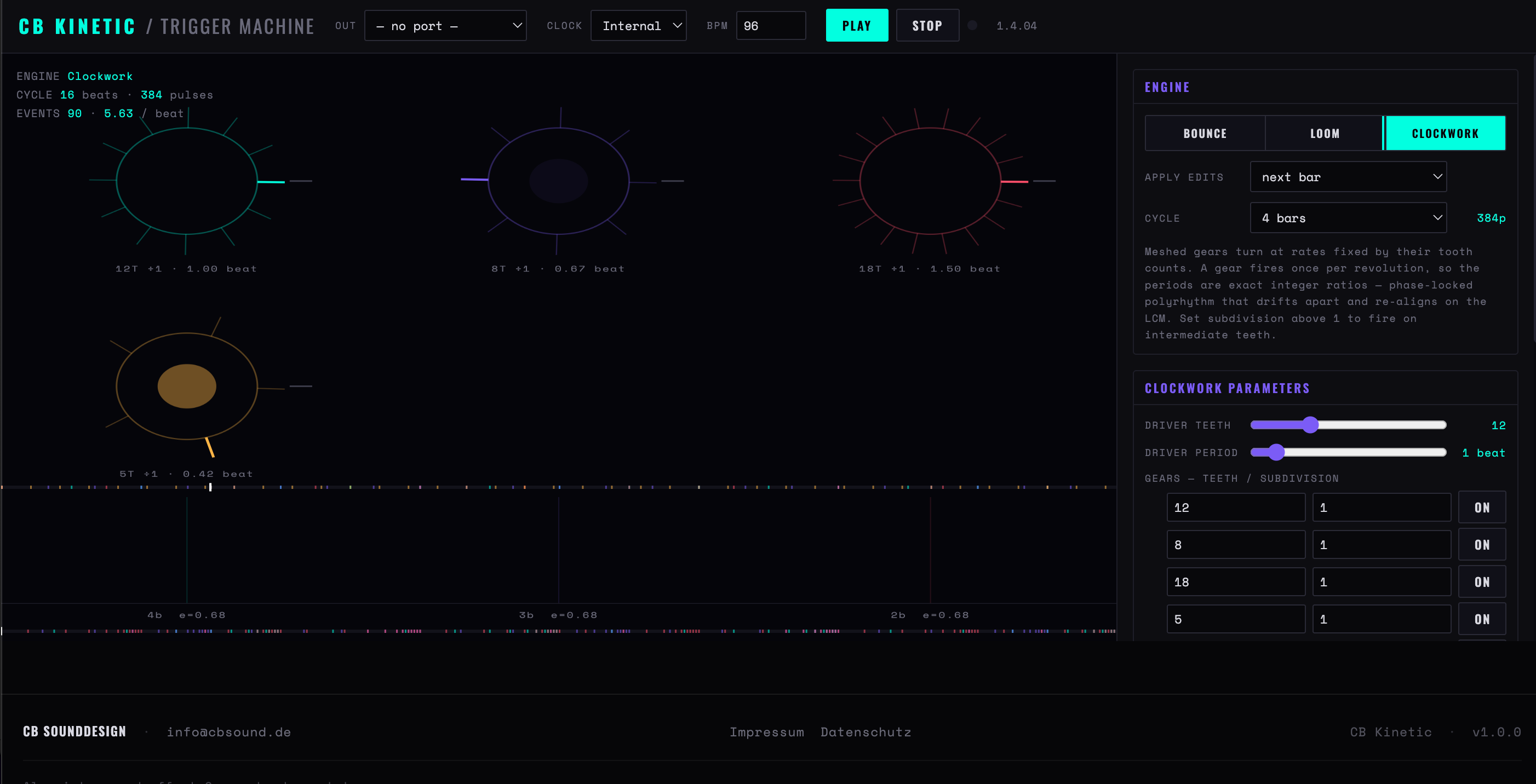
Figure 20 — Clockwork: four gears at 12, 8, 18 and 5 teeth against a twelve-tooth driver — 90 events over a sixteen-beat cycle
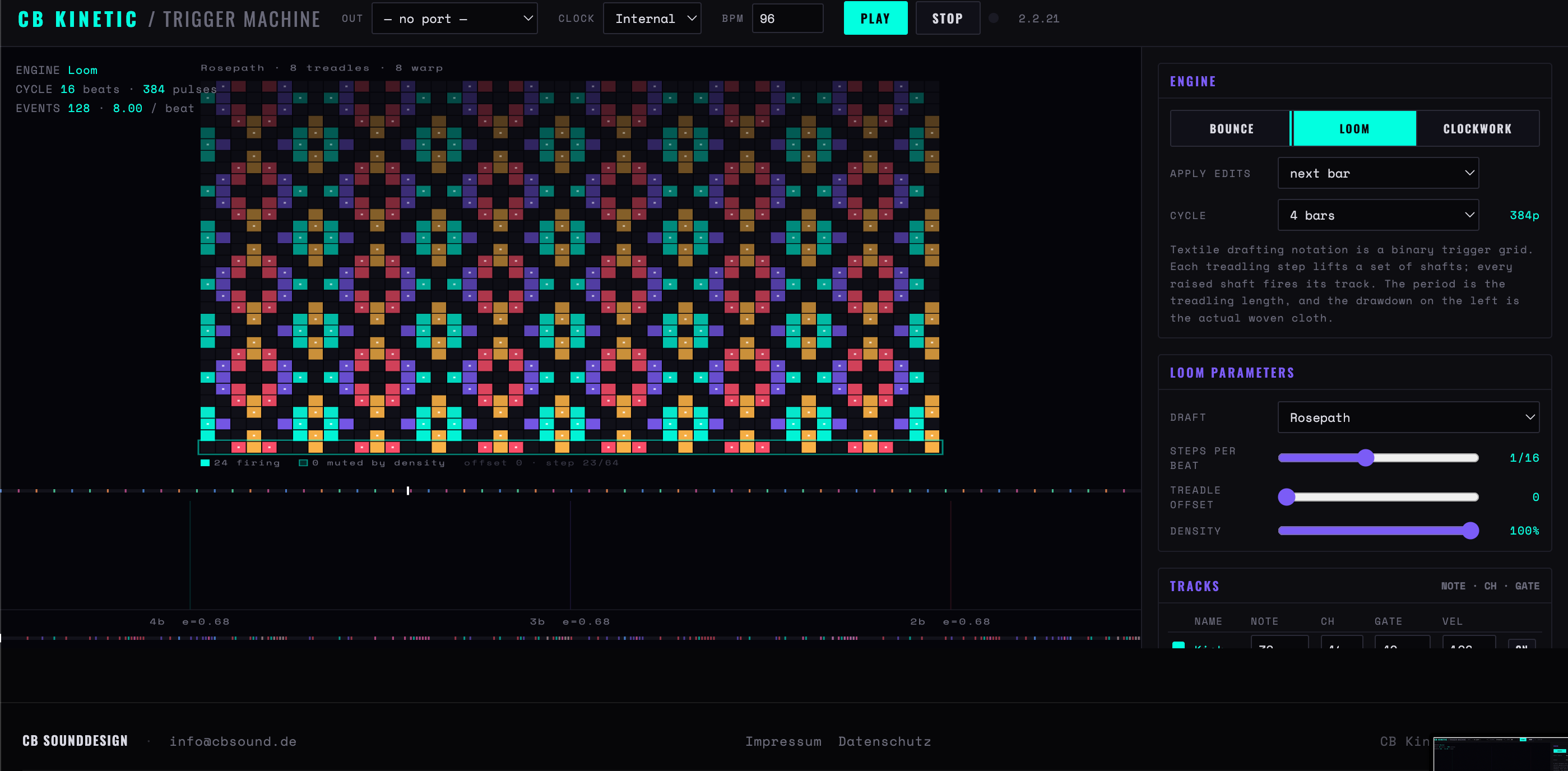
Figure 21 — Loom on a Rosepath draft. The drawdown on the left is the actual woven cloth; every raised shaft fires its track
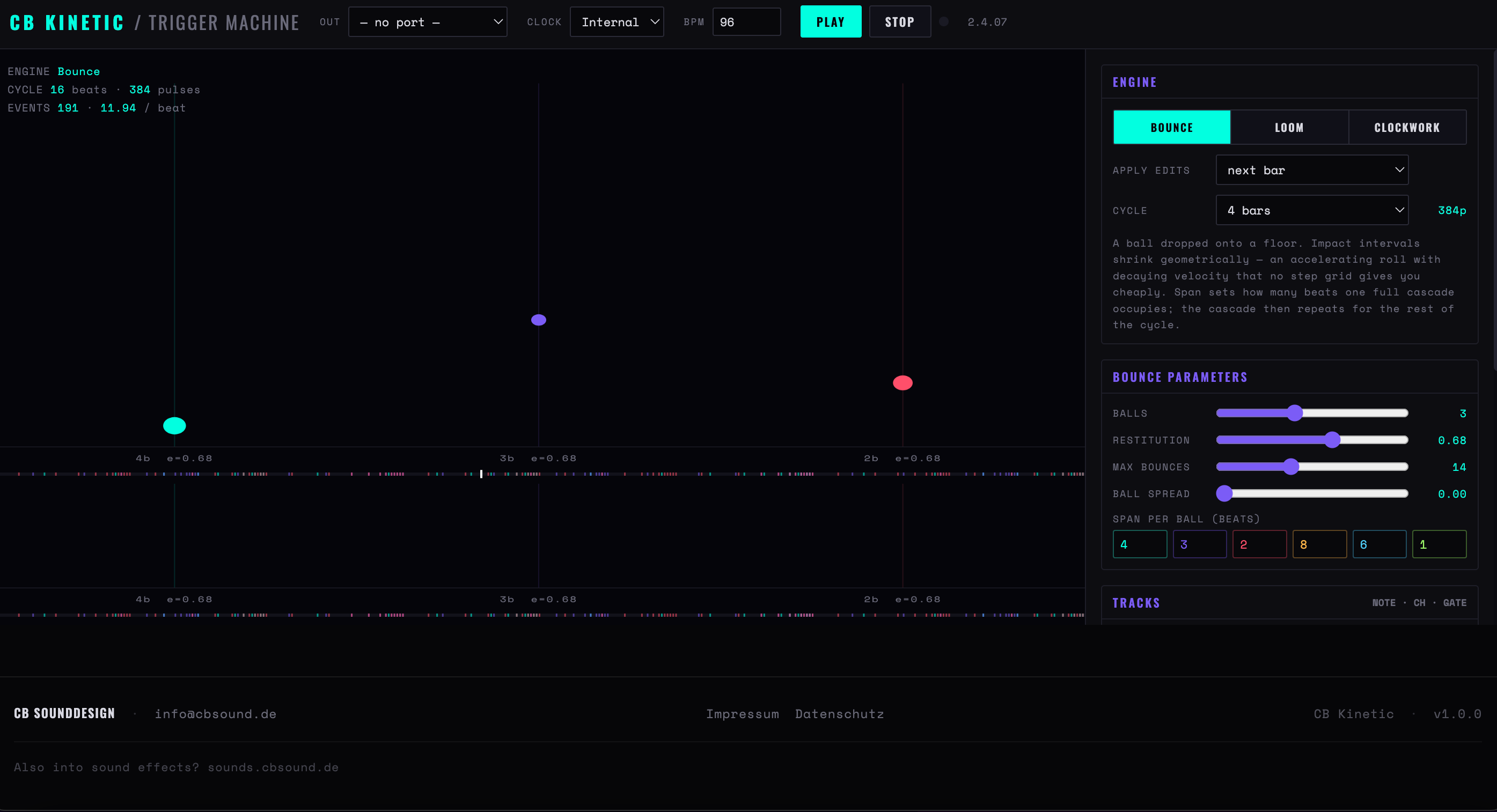
Figure 22 — Bounce: three balls at restitution 0.68, each with its own span in beats. 191 events in the same sixteen beats
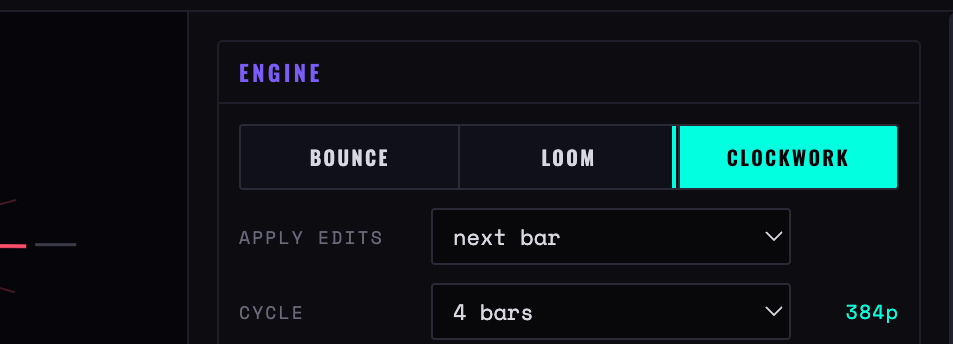
Figure 19b — Kinetic’s Engine block: the three engines, the Apply edits quantiser set to next bar, and the cycle length with its pulse count
Apply edits
When a parameter change takes effect: instantly, or quantised to the next beat, next bar (the default) or next cycle. Because Kinetic computes a whole cycle ahead, instant edits can land mid-phrase and break the mechanism's logic; quantised edits queue up and swap in cleanly. A readout beside the menu shows how many changes are pending.
Cycle
One, two, four, eight or sixteen bars. The engine fills exactly that span and it loops. Longer cycles let slow mechanisms complete; a sixteen-bar cycle on Clockwork is where the gear ratios stop sounding like a loop.
Bounce
A ball dropped on a floor: impacts get closer together geometrically while velocity decays — an accelerating roll no step grid gives you cheaply. Restitution is how bouncy the floor is, and so how long the cascade takes to settle; Max bounces caps how many impacts are used; Ball spread detunes restitution between balls so they do not settle in unison. Each ball has its own span in beats — the time one full cascade occupies — which then repeats for the rest of the cycle. Velocity follows impact strength, so the roll fades as it accelerates.
Loom
Weaving drafts read as trigger grids: each treadling step lifts a set of shafts, and every raised shaft fires its track. Seven drafts — Twill 2/2, Point twill, Rosepath, Satin 5, Overshot, Herringbone, Huck lace — give genuinely different rhythmic characters, because that is what they are for. Steps per beat sets the rate, Treadle offset rotates the sequence, and Density thins the lifts deterministically. The picture on the left is the actual woven cloth.
Clockwork
Six gears meshed to a driver. A gear fires once per revolution, and its period is its tooth count over the driver's, so the ratios are exact integers — phase-locked polyrhythm that drifts apart and re-aligns on schedule. Driver period in beats sets the overall speed; each gear has a tooth count and a subdivision that fires extra, quieter hits within a revolution. Twelve, eight, eighteen and five teeth against a twelve-tooth driver is the default, and a good demonstration.
Tracks
Six rows: note, channel, gate in milliseconds, and a velocity scale from 0 to 200 per cent applied to whatever velocity the engine produced. Since these engines generate real dynamics, the velocity scale is how you keep a busy track from overwhelming the mix.
Where Kinetic earns its place It produces the two things step sequencers are worst at: accelerating and decelerating figures, and long exact polyrhythms. A bounce cascade on a metallic percussion sound, or four gears on four toms, gives you material that would take a very long time to program by hand.
Chapter ten
Ricochet — breakout sequencer
A ball works its way through a rack of bricks, and every collision is a MIDI event. Bricks play pitched notes chosen by where they sit; walls, ceiling and paddle drive a percussion kit. The simulation runs in beat time — speed is measured in field units per beat — so it follows the clock and can be slaved like anything else, and there are no random numbers anywhere: the same rack and the same settings play the same run every time.
Brick rowpitch — one scale degree per row
Columnoctave, velocity or degree offset, or nothing
Missing bricksgaps — channels the ball can pass through
Dashed linethe ball's path; each bend is a percussion hit
Paddleauto, mouse or arrow keys — the returning angle
HUDbricks left, serve number, live balls, ball speed
Figure 23 — A thinning rack with gaps, one ball in play
The rack
Rows / Columns
Up to ten rows and twenty-four columns. Rows are pitches, so the row count is the range; columns are how much material there is to get through.
Roof gap
How much space sits above the rack. A tight roof means the ball ricochets between ceiling and bricks in fast runs; a wide one gives long quiet travel between hits.
Brick HP
Hits needed to destroy a brick, one to four. Above one, the intermediate hits are chips and go to the percussion kit — so a tough rack plays the same pitch several times before it clears.
Gaps
Punches deterministic holes in the rack so the ball finds channels through it instead of grinding the front row flat. The single most useful control for making a run interesting.
Regeneration
Off lets the piece play itself out and stop. Refill when empty rebuilds the rack as soon as it clears. Respawn puts fresh bricks back every so many bars, which keeps the texture steady rather than thinning to nothing.
New rack
In the header: builds a fresh rack and serves. Since nothing is random, this is how you move to a different run.
Ball and paddle
Balls / Speed
Up to four balls at once. Speed is in field units per beat, so it is a musical tempo relationship, not a frame rate: doubling it doubles the note density exactly.
Launch angle
18 to 72 degrees. Shallow serves sweep along rows; steep ones drill up through columns.
Paddle mode
Auto tracks the ball; Manual follows the mouse or the arrow keys. Manual play shortens the scheduler's look-ahead to a single pulse so the ball answers where you actually are — the trade is slightly less timing headroom.
Paddle speed
In the same units as ball speed, and the most musical control in the app. Set it above the ball and the paddle always arrives centred, returning a narrow, repetitive angle; set it below and it arrives late and off-centre, so returns vary and the run stops repeating.
English
How much the paddle's contact point bends the return. High English turns small paddle movements into large changes of direction.
Paddle width
Also the difficulty: a narrow paddle drops balls, which fires the Ball lost percussion event and re-serves.
Pitch map and percussion
Row →
Degree with the top row highest, the same inverted, or stacked thirds — two scale degrees per row, which turns a rack into chords rather than a scale.
Column →
Nothing, octave zones across thirds of the field, a velocity ramp left to right, or a degree offset. Octave zones plus a shallow serve angle gives long ascending or descending sweeps.
Velocity
From impact strength, unless the column map is set to the velocity ramp — then position takes over.
Note gate
20 to 1500 ms. Long gates on a fast ball give overlapping clouds; short gates keep it percussive.
Quantise
Off plays the raw impact time, which is the honest setting and sounds like physics. Quantising to 1/8 or 1/16 snaps collisions onto the grid, which makes the same run sit inside a track with a conventional drum part.
Percussion table
Six events with their own note, channel, gate, velocity scale and mute: paddle, side wall, ceiling, brick chip, ball lost, rack cleared. These carry the groove once the rack thins out — mute them and a late run sounds empty.
Chapter eleven
Flux — modulation generator
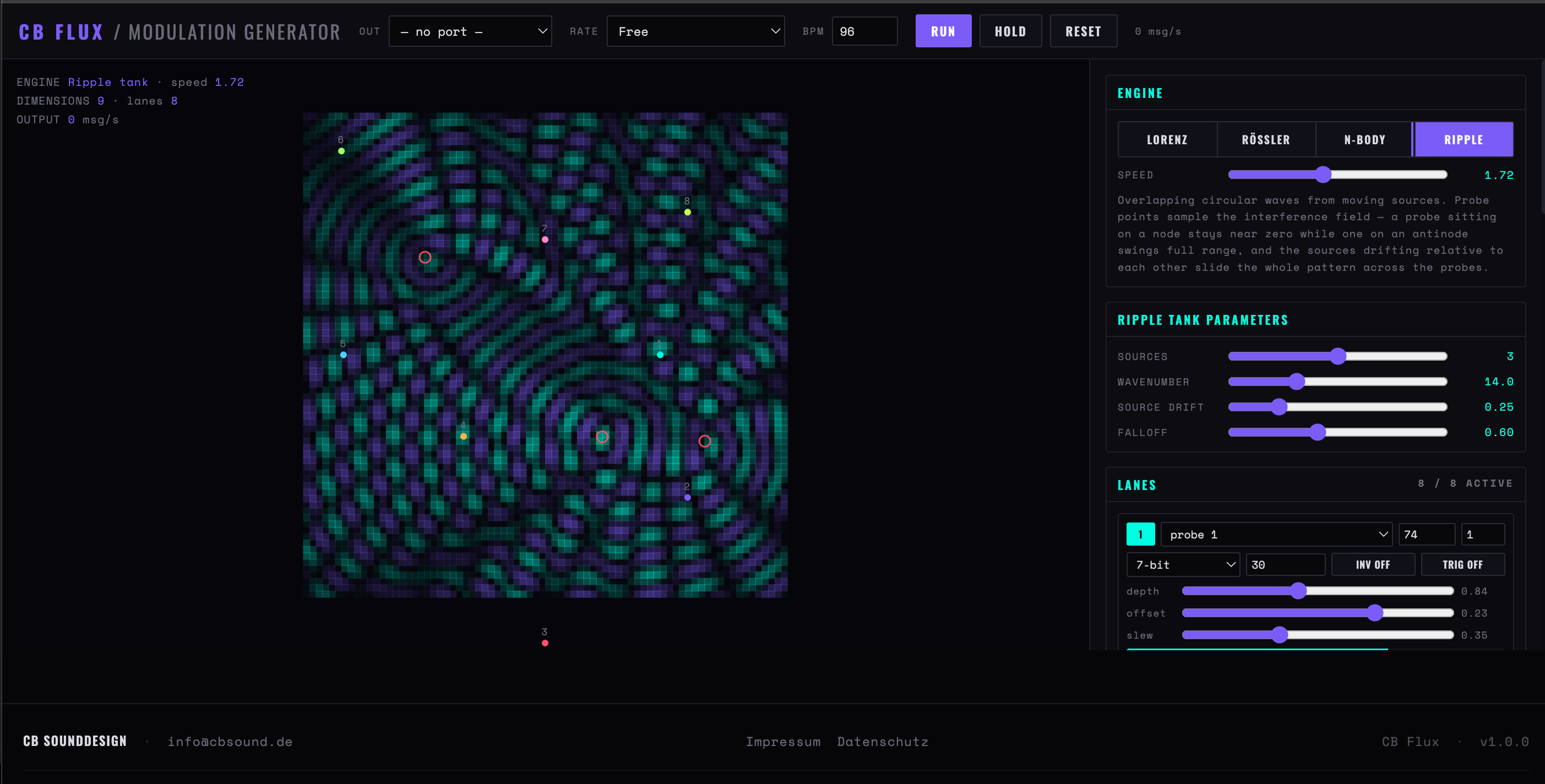
The one app here that does not play notes. Four continuous systems — two chaotic attractors, a gravitational simulation and a ripple tank — each exposing several dimensions, mapped onto eight controller lanes. Use it alongside a sequencer, not instead of one: slave it to the same clock and let it move against the part rather than inside it.
CC 74z
CC 71x
CC 1y
CC 10speed
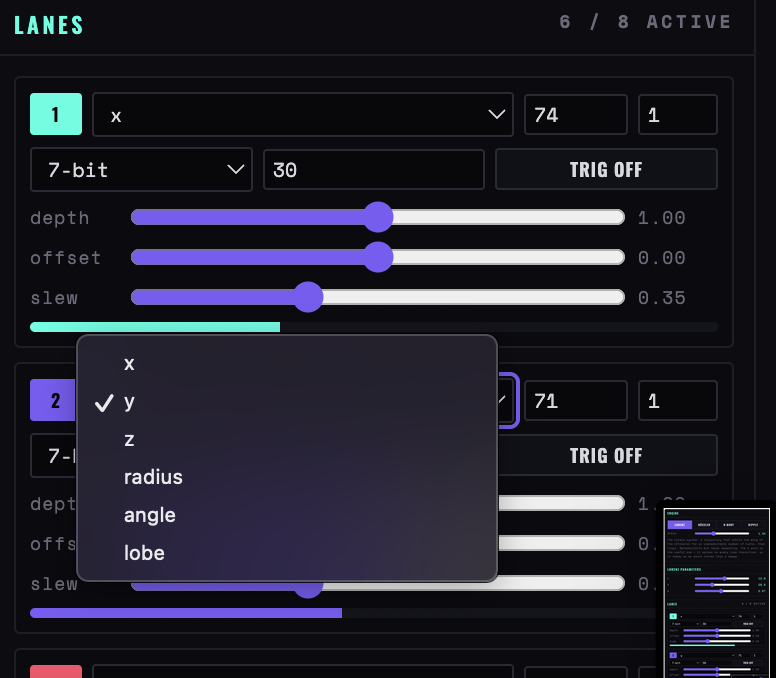
Each lane: a dimension, a controller number and channel, depth and offset, invert, slew, its own rate ceiling, and 7-bit, 14-bit or NRPN resolution.
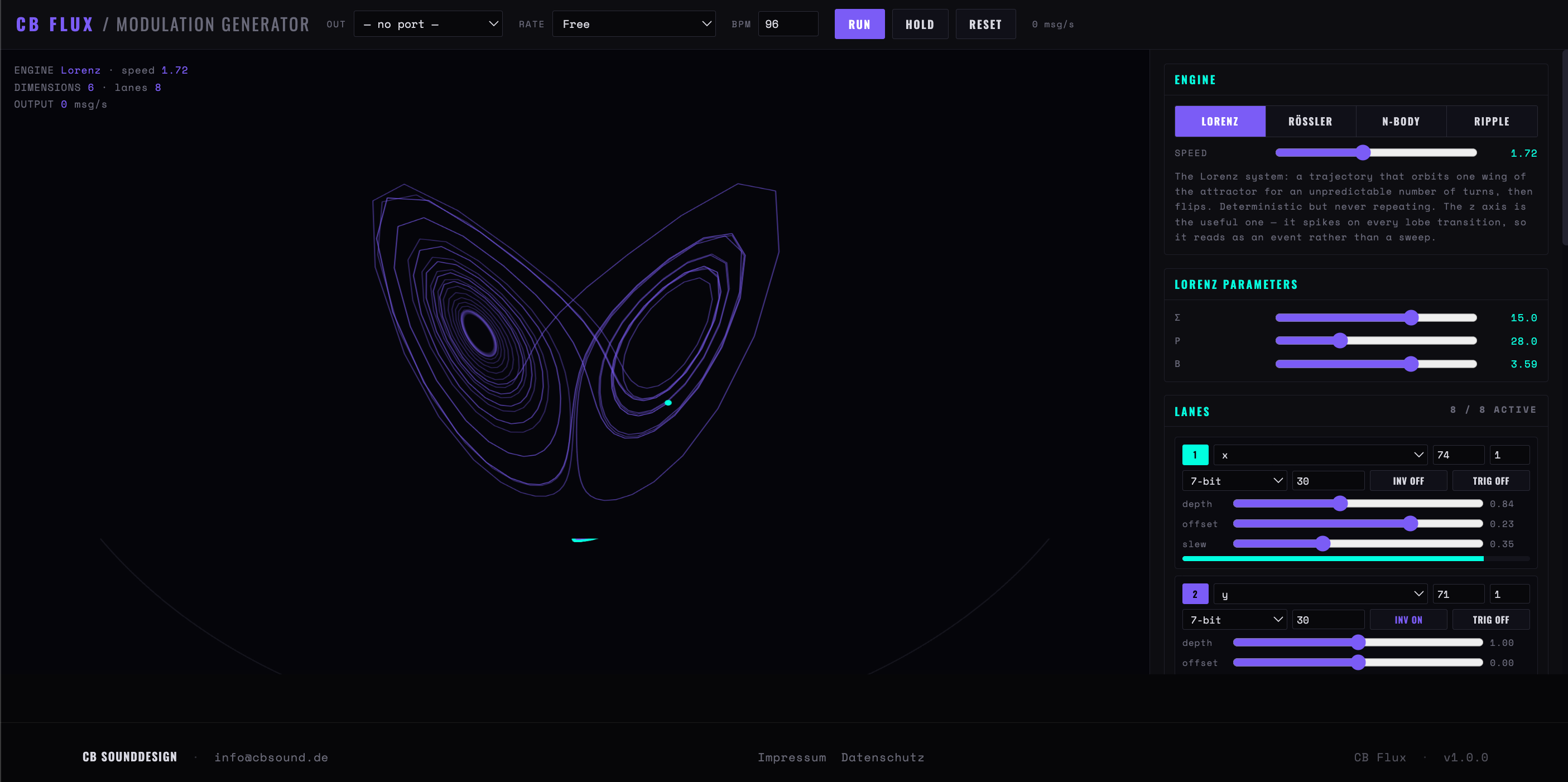
Figure 24 — Four active lanes reading three dimensions of the Lorenz system
Figure 25 — Flux on Lorenz. Eight lanes read the six dimensions of one trajectory; the readout at the top left reports engine, dimension count and message rate
Figure 26 — The ripple tank: three drifting sources, eight numbered probes sampling the interference field
Engines
Lorenz
Orbits one wing of the attractor for an unpredictable number of turns, then flips to the other. Deterministic and never repeating. The z axis is the useful one — it spikes on every wing change, which reads as an event rather than a wobble.
Rössler
A single scroll: a slow outward spiral, then a sharp fold back. Far more regular than Lorenz, with an audible quasi-period — closer to a drifting LFO than to chaos.
N-Body
Gravitational bodies with a softened potential. Stable ellipses give clean periodic modulation with a real velocity curve — fast at closest approach, slow at the far end — which no triangle wave will imitate. Raise G and the system destabilises.
Ripple tank
Overlapping circular waves from moving sources, read by probe points. A probe on a node barely moves while one on an antinode swings full range — so the interesting control is where the probes sit, not how fast the waves go.
Speed / Rate
Speed is the integration rate. Rate offers three relationships to time. Free is absolute, unaffected by tempo. Scaled to BPM field tracks the typed tempo, so a modulation that took two bars still takes two bars at a different tempo. MIDI clock in reveals an input port beside it and locks the integration to incoming clock — the BPM field then reads — ext and is measured, not set.
Run / Hold / Reset
Hold freezes the system where it is and keeps sending that value — a useful way to park a good setting. Reset returns the engine to its initial state, which for a chaotic system means the run starts over identically.
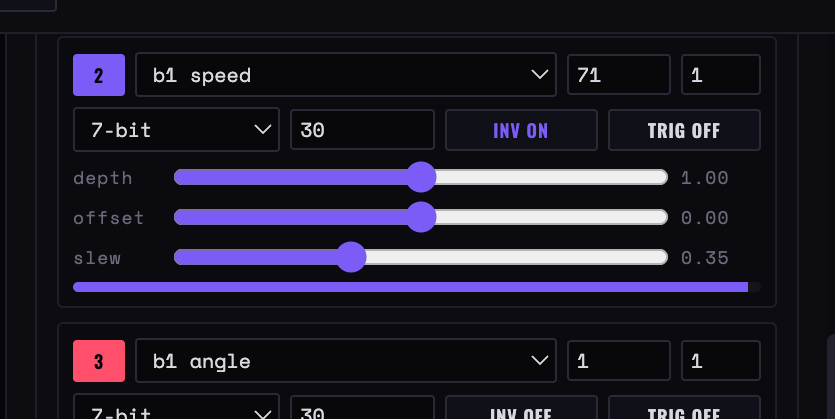
Four lanes on N-Body dimensions
What one lane can read
Figure 27 — Four N-Body lanes as the app shows them: each picks a dimension — b1 speed, b1 angle, b2 radius, b2 speed — with its controller number, channel, resolution, rate ceiling, invert and trigger switches, then depth, offset and slew
Lanes
Dimension
Which output of the engine this lane follows — an axis, a speed, a distance, a probe. Several lanes may read the same dimension with different depth, offset or inversion.
Depth / Offset / Invert
Scale, shift and flip around the centre. Depth well below full with an offset is how you aim a lane at a narrow, useful part of a parameter's range instead of sweeping it end to end.
Slew
Smoothing. Low values turn a jagged dimension into something a filter can follow without zipper noise; high values pass the spikes through intact.
Resolution
7-bit is one controller message. 14-bit sends a pair for finer steps, and NRPN sends a longer sequence — both cost more bandwidth, so use them only where the receiving instrument actually resolves them.
Rate and cap
Each lane has a rate ceiling, and the Output section caps the total. A DIN cable carries roughly 320 three-byte messages a second, shared with everything else on it — keeping the cap well under that is what stops modulation from delaying your notes. Values are only sent when they change, so a slow lane costs almost nothing.
trig
A side output: emits a note when the lane's value crosses its threshold upward. Good for closest-approach passes and zone crossings — but it is a bonus, not the purpose of the app.
Chapter twelve
Fossil — frozen event player
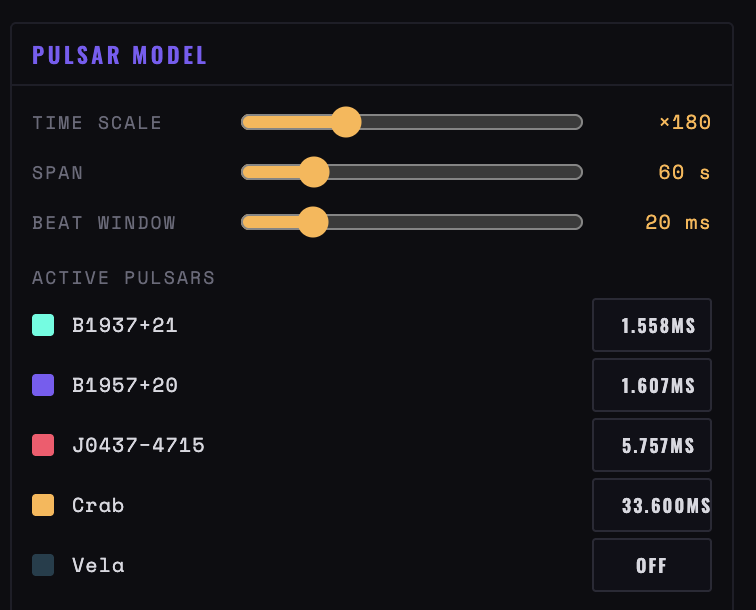
Physical models of events that happen once — an earthquake, a tide, a geyser cycle, a pulsar's spin — computed as a fixed list of impulses, stretched onto a number of bars, and looped. Nothing evolves while it plays: this is a score, and the work is in choosing which part of the event to loop and which impulses to keep.
Impulseseach becomes a note; height becomes velocity
Thresholdeverything below it is dropped
Windowthe part of the event that is looped
Event → barshow much musical time the window occupies
Figure 28 — A seismic event with a window over the main shock and its first aftershocks
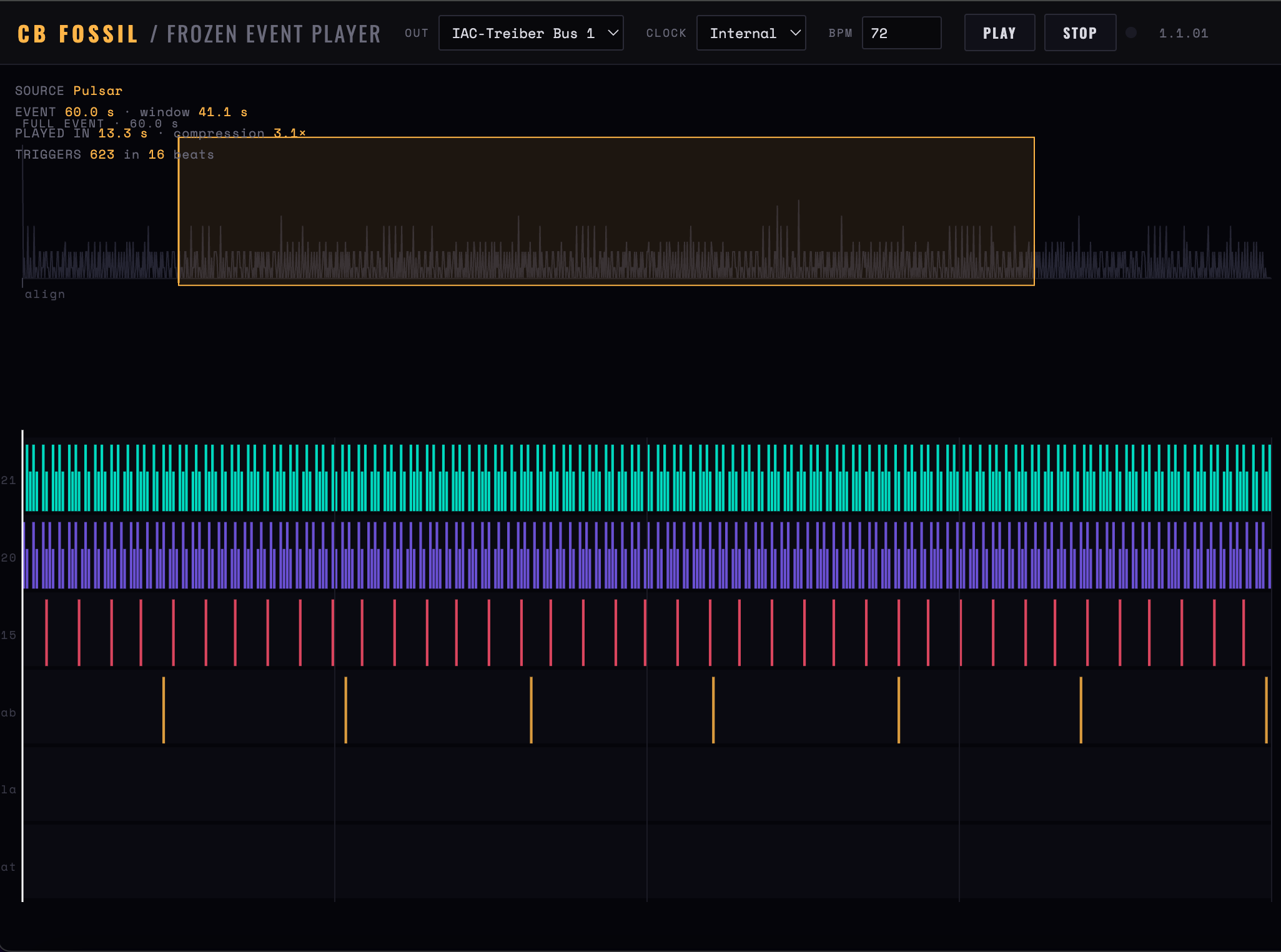
Figure 29 — Fossil playing five millisecond pulsars. Sixty seconds of real time compressed 3.1× into four bars — 623 triggers
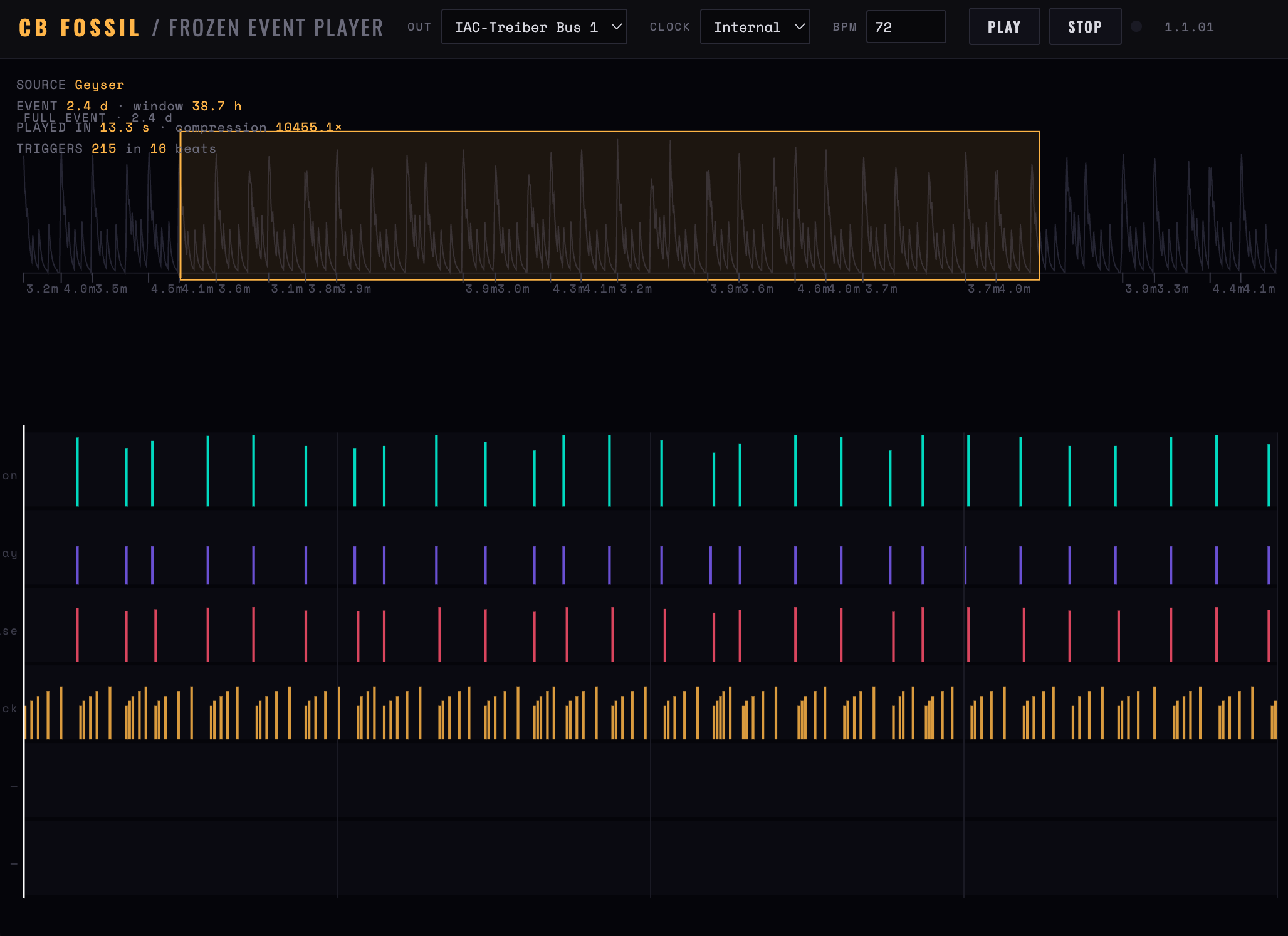
Figure 30 — The geyser source: 2.4 days of eruptions compressed over ten thousand times, with the window covering 38.7 hours of it
Seismic, and its six phase tracks
Tidal, geyser and pulsar
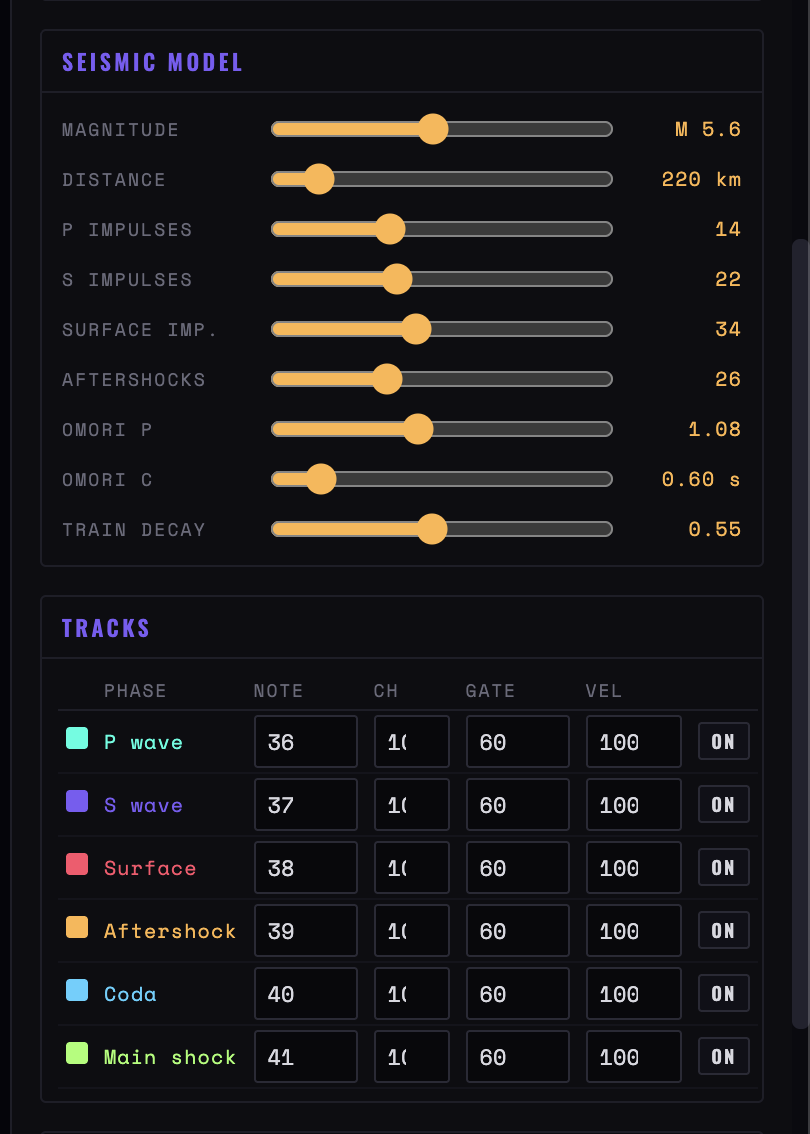
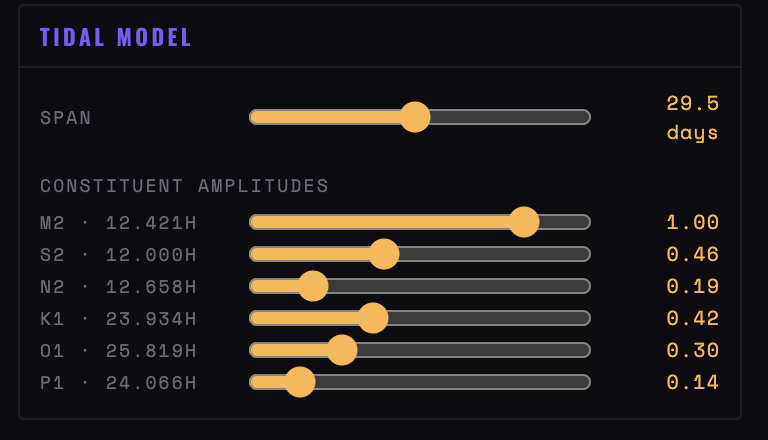
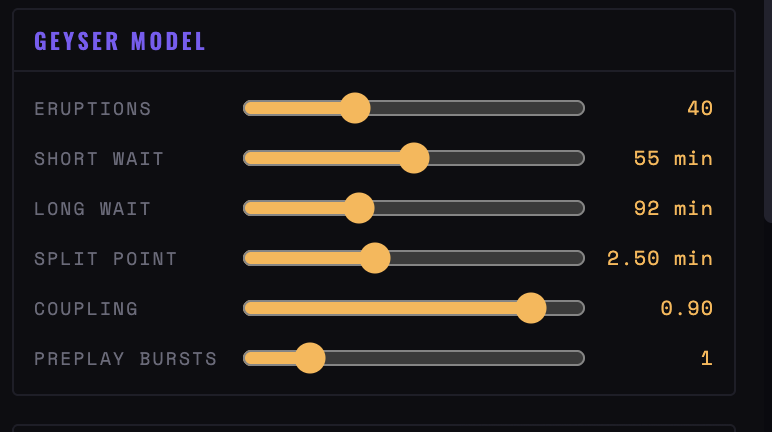
Figure 31 — The four modelled sources, with every constant exposed: Omori’s p and c for the aftershocks, the six tidal constituents by name and period, the geyser’s two waits and its coupling, and five real pulsars with their periods in milliseconds
Sources
Seismic
P wave, S wave and surface arrivals separated by travel time, each a decaying wave train, followed by aftershocks spaced by Omori's law. Magnitude and distance are the two controls that matter: distance sets how far apart the three arrivals fall, which is the rhythm of the attack. Six tracks — the arrivals, the aftershocks, the coda and the main shock.
Tidal
The tide as a sum of fixed sinusoids with periods from orbital mechanics — lunar and solar semidiurnal, elliptic, and two diurnal terms. Incommensurate periods give a pattern that repeats only over a fortnight, so it never quite loops. Triggers on high and low water, rising and falling crossings, and spring peaks.
Geyser
Thermal recharge: a long eruption empties the reservoir and buys a long wait, a short one a short wait, so intervals alternate in a way that is irregular but not random. Coupling is how strongly the last eruption determines the next interval — turn it down and the pattern flattens into a metronome.
Pulsar
Real millisecond-pulsar periods — the most stable clocks known — running together. Because the periods are mutually incommensurate, the polyrhythm drifts continuously and never truly repeats. A sixth track marks the beat between them.
CSV
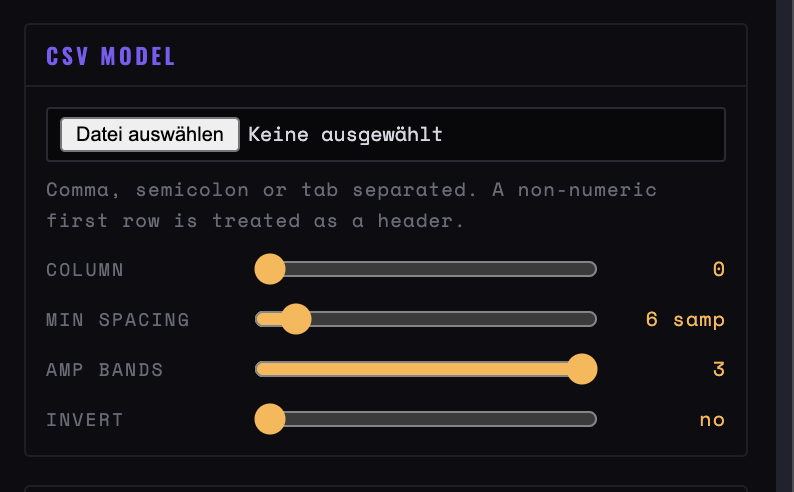
Your own data: one amplitude column from a seismogram, a river gauge, a light curve, a sensor log. Peaks above the threshold become triggers and peak height becomes velocity, with min distance setting how close two peaks may be and bands splitting them across tracks by height. The other four sources are models, not recordings — this is where real data goes.
Window, quantise, threshold
Reading your own CSV
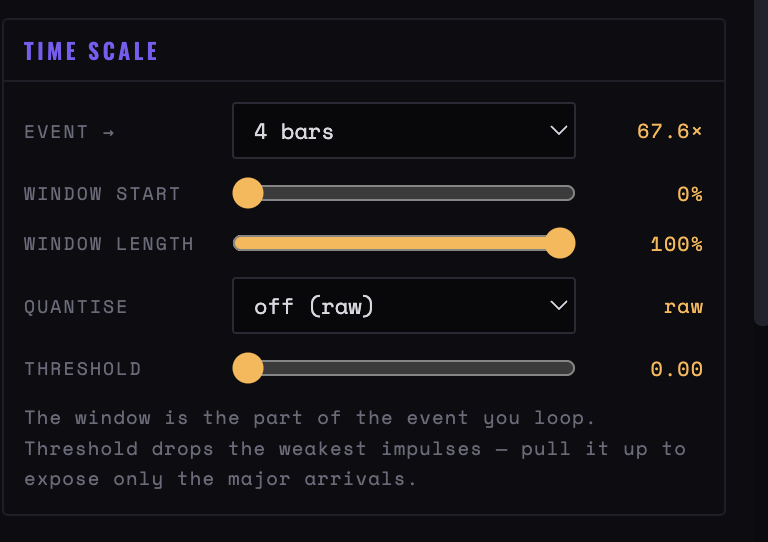
Figure 32 — Fossil’s Time scale block, where nearly all the musical choice happens, and the CSV reader beside it
Time scale
Event → bars
One to thirty-two bars for the whole window. The ratio beside it tells you how much real time is being compressed — the point at which an earthquake becomes a drum fill or a slow build.
Window
Start and length as a share of the event. Almost all the musical choice is here: the first tenth of a seismic event is an attack, the middle is a groove of aftershocks, and the tail is sparse punctuation.
Quantise
Off keeps the raw arrival times, which is what makes these sources sound unlike programmed rhythm. Snapping to 1/16 or a triplet division lets the same event lock to a track.
Threshold
Drops the weakest impulses. Raising it thins a wave train down to its major arrivals, which is usually the difference between a wash and a rhythm.
Position
The bar, beat and pulse readout in the header — the only place these four apps show you where in the loop you are.
Chapter thirteen
Running several at once
All ten speak the same clock, so they combine without ceremony. The rule is simple: exactly one clock master, everything else on external.
One master
Put Sequencer Lab — or your hardware — on internal with Clk out on, and set every other app to External with its Clock in pointed at that source. Start the master and the others follow, including start and stop.
Routing between tabs
Browsers cannot connect one tab's MIDI output to another tab's input directly. You need a virtual port on the operating system — a loopback or IAC-style bus — appearing as both an output and an input. Point the master's output at it and the followers' clock inputs at it.
Channels
Plan them before you start. A workable division: drums on 10, bass on 1, Automata's four bands on 2 to 5, Vector Path's layers on 6 to 9, Harmonograph on 11 to 14 — it needs one channel per pendulum for its tuning to work.
Controllers
Physarum sends a block of consecutive CCs from its base number, and Harmonograph sends two. Keep those blocks apart from each other and from Vector Path's per-layer CCs, or one app will overwrite another's modulation.
Foreground
Only the visible tab runs at full speed, so several apps in several background tabs will stall. Two windows side by side works; six tabs does not. Where you need many parts at once, prefer several tracks inside one app.
Who plays what
In practice: Sequencer Lab, Quadrivium or Kinetic for the rhythm, one of Automata, Physarum, Vector Path or Ricochet for the moving part, Harmonograph for held harmony, and Fossil where you want a fixed score rather than a process. Two generative apps at once tends to sound like neither. Flux is the exception — it plays no notes, so it layers under any of them.
Bandwidth
Notes and controllers share the cable. If Flux is running lanes at a high cap while three apps send notes, the notes are what arrive late. Set Flux's cap low first, then raise it until you hear timing suffer, then come back down.
Chapter fourteen
When something goes wrong
The permission panel will not go away
The page is on file:, or the browser has no Web MIDI. Serve the folder and open it from localhost, in Chrome, Edge or Opera.
MIDI access was blocked
The prompt was refused once and the refusal is remembered. Clear the site's permissions and reload.
Transport runs, nothing sounds
In order: Out is on the wrong port or none; the channel does not match the receiving instrument; or the app has nothing to play — an empty grid, an empty path, no probe over a trail. None of these apps make sound themselves.
Press Play and nothing moves
Source is External and no clock is arriving — check Clock in, and that the sending device is actually transmitting clock rather than just notes.
Timing drifts or stutters
The tab is in the background, or another tab is busy. Bring it forward. On external clock, check the jitter readout in Sequencer Lab before blaming the app — a peak far above the average is the sending device's fault.
Notes hang
Press Panic. It works whether or not the transport is running, and closing the tab mid-play sends it automatically. Long gates plus a fast step rate is the usual cause — Physarum at 400 per cent gate will always overlap.
Automata goes silent
The population died or froze — the Status readout says which. Switch Stall to Revive, or reseed with the R-pentomino, which stays alive far longer than a random fill.
Physarum never fires
Either the colony has not built anything yet — give it ten seconds — or Threshold is above what this preset reaches. Watch the fill arcs inside the rings: if they barely move, lower Threshold or raise Deposit.
Physarum fires constantly
Trigger is on Sustained, which fires every sample while covered. Switch to Growth only and raise Retrig.
Dragging moves a probe instead of the colony
You started the drag inside a probe ring. Start on empty canvas to pull the colony.
A drawn path vanished
Drawing replaces the selected layer's path rather than adding to it, and the label at the top left of the canvas says which layer that is. Check you were not drawing over the layer you meant to keep.
Vector Path plays a jump every lap
The path is open and Close paths was off when you drew it. Open paths bounce rather than loop; redraw with Close paths on for a seamless circuit.
A step click does nothing
In Sequencer Lab, only Trigger and Gate mode switch steps on. Every other mode edits a step that is already on.
Slides do not slide
Slide overlaps two notes and lets the synth glide. It needs a monophonic patch with portamento on; on anything polyphonic you hear a chord.
Harmonograph sounds out of tune
Bend range does not match the synth's own pitch-bend range. Set both to the same number of semitones, or switch Just off to hear plain equal temperament.
Harmonograph fades to nothing
Decay is working as intended and Auto-strike is off or too infrequent. Set Auto-strike to eight bars, or lower Decay.
No port list in the newer four
Kinetic, Ricochet, Flux and Fossil ask for MIDI on load and have no permission panel: a menu reading unsupported or denied means the browser has no Web MIDI, or the prompt was refused. There is no Rescan — the menus refresh themselves, but a reload settles it.
Kinetic plays nothing
On Clockwork, a gear whose period works out shorter than one pulse is skipped — raise the driver period or lower the tooth count. On Loom, Density low enough removes every lift.
Ricochet repeats the same figure
Paddle speed is above ball speed, so the paddle always returns from centre. Drop it below the ball speed, or raise English and Gaps.
Ricochet went quiet
The rack cleared with Regeneration off, or every ball was lost. Press New rack, or set Regeneration to refill or respawn.
Flux sends nothing
It is on Hold, every lane is off, or the values are not changing — lanes only transmit on change. Check the meters: a still meter means a still dimension, not a broken lane.
Flux stutters the whole rig
The message cap is too high for the cable. Lower it, raise slew, or move lanes to 7-bit — 14-bit and NRPN cost several messages per value.
Fossil is too sparse or too dense
Threshold and window, in that order. A wide window on a whole seismic event is mostly silence; the first tenth is where the impulses are.
Settings lost on reload
Expected in the newer four — they have no save or load at all. The first six at least write JSON.
Typing does nothing
Shortcuts are ignored while a field or menu has focus. Click empty space first.
A red box appears bottom left
Physarum's render loop stopped and is telling you why. Reload; if it recurs, keep the message.
Work disappeared
Nothing is kept in the browser. Save to JSON — one file per app — and remember that Load replaces the whole session.
Appendix
Keys and figures
Shared
Space
Play and stop
Shift-click
Tempo arrows in tens
Per app
G · R · C
Automata — step a generation, random seed, clear
R · S
Physarum — reseed, spore
1–4 · C
Vector Path — select layer, clear it
1–6 · M
Quadrivium — select track, mute it
S · C
Harmonograph — re-strike, clear trail
—
Sequencer Lab — mouse only, apart from Space
← →
Ricochet — paddle, in keys mode
—
Kinetic, Flux, Fossil — mouse only
Figures worth remembering
24 ppqn
clock resolution, in and out
~120 ms
how far ahead notes are scheduled
20–300
tempo range, BPM
16 steps
Sequencer Lab pattern length, per track
32 steps
Quadrivium maximum track length
30,000
Physarum maximum agents
~320 msg/s
what a DIN cable carries — keep Flux's cap well under it