CB Sounddesign
16 pads · Sequencer · MIDI out
Operator's manual · v1.0
Operator's manual · v1.0
CB Drumpad 16
Sixteen pads, each holding a sample you dropped or a synthesised voice, each with its own step lane. It plays from the computer keyboard, from MIDI hardware, and out to MIDI gear — which is the part that makes it more than a sample player: it can drive a hardware drum machine from patterns you build here.
Play it
Keyboard, MIDI in, or the pads
Sequence it
A lane per pad, chained
Send it
MIDI out, clock, .mid export
The keyboard layout
The four rows 1 2 3 4 / Q W E R / A S D F / Z X C V map to the sixteen pads in reading order, so the pad grid and the keyboard grid are the same shape. Hold the Accent key for a harder hit, the Ghost key for a softer one, and Space to start and stop.
The four rows 1 2 3 4 / Q W E R / A S D F / Z X C V map to the sixteen pads in reading order, so the pad grid and the keyboard grid are the same shape. Hold the Accent key for a harder hit, the Ghost key for a softer one, and Space to start and stop.
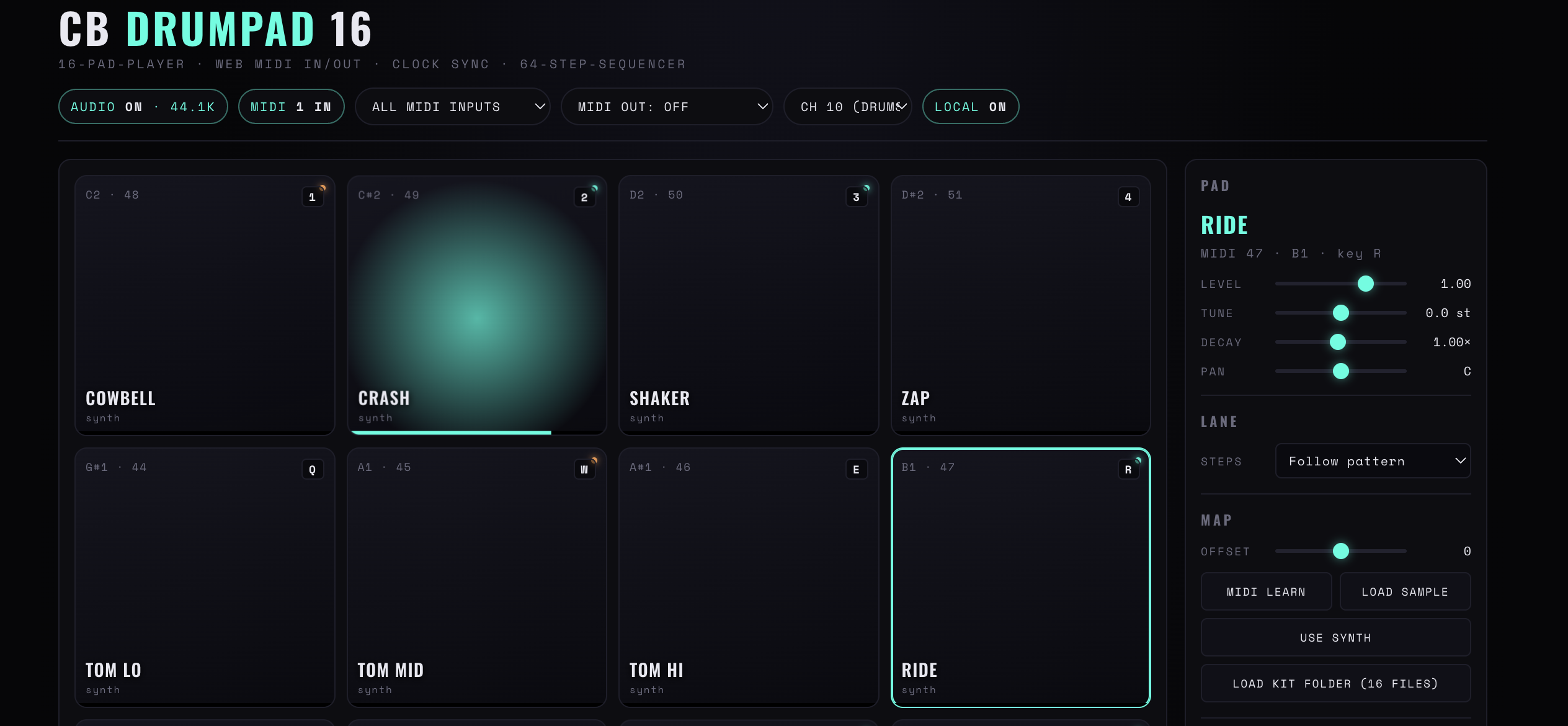
Figure 1 — The pad grid with the header strip above it and the selected pad’s settings on the right. Each pad shows its note name, MIDI number and keyboard key
Chapter one
Audio, MIDI and clock
The top strip decides where sound comes out and who is in charge of time. Set it once per session.
Audio
On or off. Turning audio off leaves the sequencer and MIDI out running — which is exactly what you want when the pads are driving a hardware machine and you do not want the internal samples doubling it.
MIDI in
A specific port or All MIDI inputs. All is the right default; narrow it only when two controllers are fighting.
MIDI out
Off, or a port. Each pad sends its own note and channel, so the pad grid becomes a remote control for whatever is listening.
Local on / off
Whether a pad also plays its own sample when it fires. Local off is the setting for driving external gear: the pad sends MIDI and stays silent.
Clock: int / ext
Internal tempo, or follow incoming MIDI clock. On external the BPM field goes read-only and shows what is arriving.
Send clock
Sends MIDI clock out so hardware follows this page. Only one device in a chain may do this; if the hardware is already the master, leave it off.
BPM / Swing / Master
Tempo, the delay on every second step, and output gain. Swing applies to the sequencer, not to pads played by hand.
Panic
All notes off on every channel, immediately. The button to reach for when external gear is holding a note — it is a MIDI fault, not an audio one, and stopping the transport will not clear it.
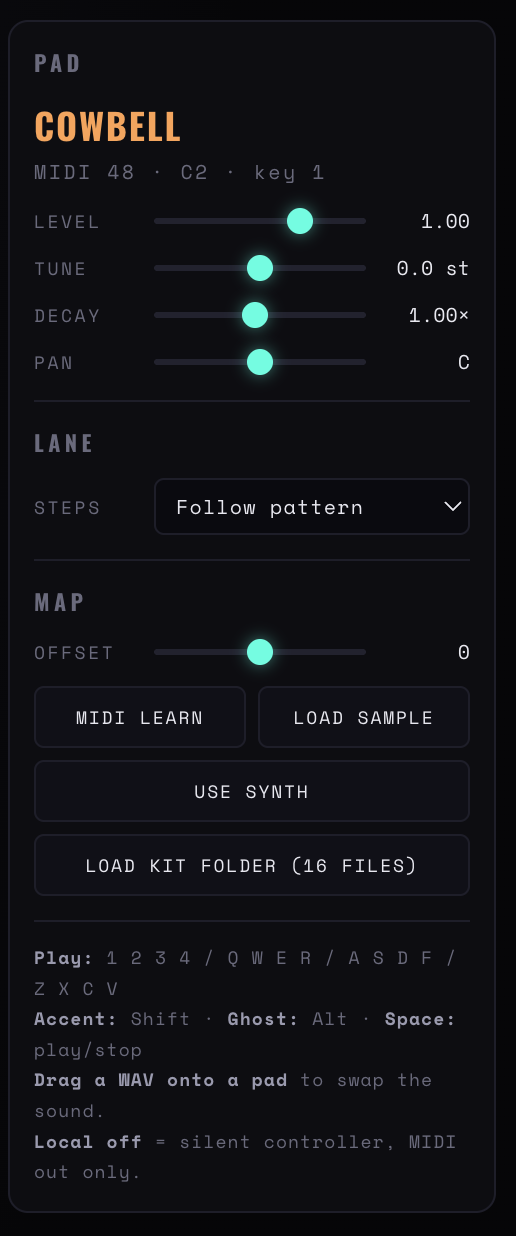
Figure 3 — The pad panel: level, tune, decay and pan, the lane’s step source, the MIDI offset, and the four load buttons with the keyboard reference beneath
Chapter two
A pad
Select a pad and the right-hand column becomes its settings. Nothing here is global; every pad carries its own copy.
Load sample
A WAV per pad. Dragging a file onto a pad replaces its sound without selecting it first, which is the fast way to swap a kick.
Load kit folder
Sixteen files at once, in file-name order onto pads one to sixteen. Name the files with a leading number and the mapping is predictable.
Use synth
Replaces the sample with a synthesised voice. Useful for the pads that are pure function — a click, a metronome, a test tone — where a file would be overkill.
Level / Tune / Decay / Pan
Gain, transposition in semitones, length, and stereo position. Tune reads in semitones rather than cents because on drums that is the useful resolution.
Map / Offset
The MIDI note the pad sends and receives, and a transposition applied to it. Set the map to match the hardware rather than reprogramming the hardware.
MIDI learn
Arms the pad, then the next note or pad hit it receives becomes its mapping. Faster and more reliable than reading note numbers out of a manual.
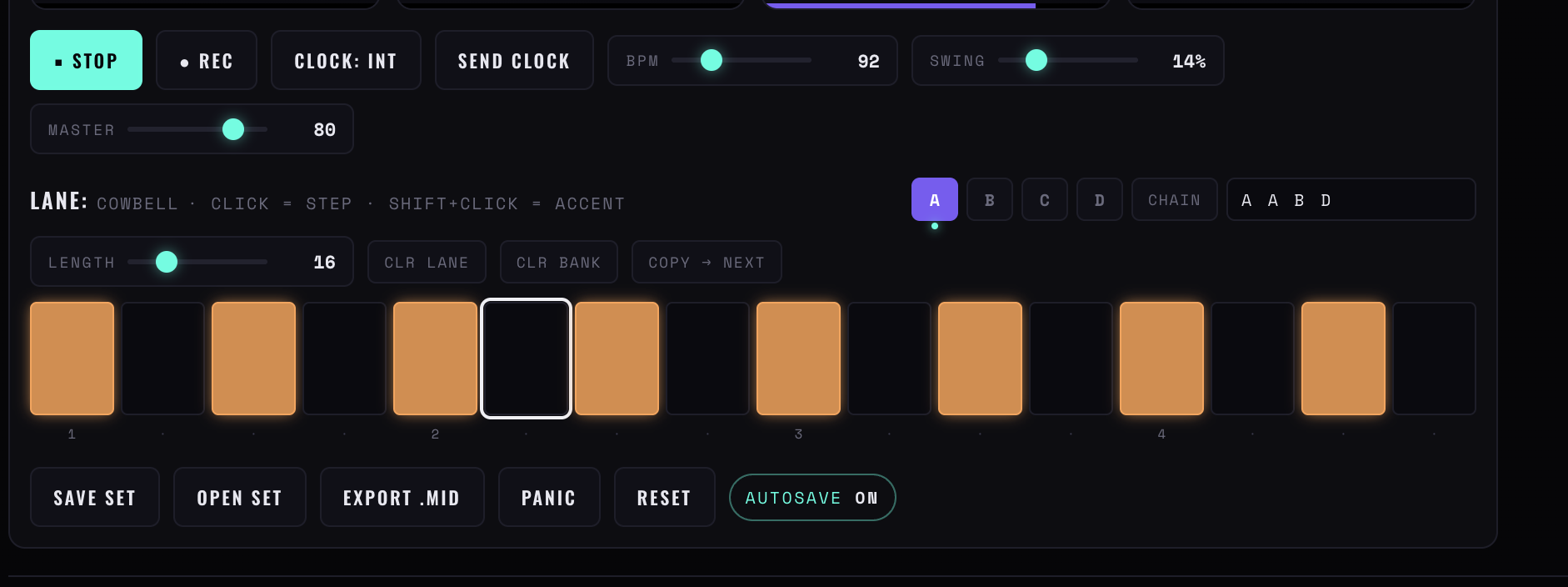
Figure 2 — The transport and lane strip: stop, record, clock source, send clock, BPM, swing and master, then the lane with its bank buttons, chain and step row
Chapter three
Lanes and chains
One lane per pad, with a chain on top so a pattern can be longer than one lane.
Lane
Which pad’s lane you are editing — the label names the pad, so Lane: Cowbell is unambiguous even when the grid is full. Click a step to place it, shift-click for an accent.
Banks A to D
Four banks per lane, and a chain field that plays them in a written order — A A B D is four bars with a variation in the third and a fill in the fourth. That is how sixteen steps become a sixty-four-step pattern.
Copy → next
Duplicates the current bank into the following one. The fast way to build a chain: copy, then edit only the steps that should differ.
Steps / Length
The pad’s step source — Follow pattern or its own count — and how many steps of the lane are live. Shortening a lane truncates rather than clearing, so lengthening it again brings the steps back.
Chain
Plays lanes in a sequence rather than looping one. This is how a sixteen-step machine produces a four-bar pattern with a fill at the end.
Clr lane / Clr bank
Clears the current lane, or every lane in the bank. Both are immediate and neither asks — save the set first.
Chapter four
Sets and export
Save set / Open set
The whole instrument — pads, samples, lanes, chain, tempo — as a file. Samples are carried inside it, so a set opened on another machine is complete.
Autosave
Keeps the current state in this browser between reloads. A convenience, not an archive: it holds one state and overwrites it.
Export .mid
The pattern as a standard MIDI file, with each pad on its mapped note. This is the handover format — drop it into a DAW and the pattern is there without the samples.
Reset
Back to an empty instrument. Everything goes, including the samples.
Chapter five
When something is wrong
Pads silent, meters moving
Local off is set. The pads are sending MIDI and deliberately not making sound.
Hardware plays nothing
Check MIDI out is not off, then check the pad's Map matches what the hardware listens for. A pad on note 36 will not trigger a machine expecting note 60.
Hardware drifts
Two clock masters. Either Send clock here with the hardware set to external, or Clock: ext here with the hardware as master — not both.
Note stuck on
Panic. Then check whether a pad's decay is longer than the interval between its hits.
blocked on the MIDI line
Permission was refused. Reload and allow it. n/a instead means the browser has no MIDI support at all.
CB Sounddesign · Drumpad 16Operator's manual · v1.0