CB Sounddesign
Generative texture · Render to WAV
Operator's manual · v1.0
Operator's manual · v1.0
CB Ambient Engine
A generative texture machine that is really a render engine. You set a voice, a pitch world, a pulse and a space, then it produces a finished stereo WAV of whatever length you ask for. It plays live so you can hear the settings, but the output is a file — which is why every decision in the panel is repeatable from a seed.
Set
Voice, pitch, time, space
Audition
Live playback, reroll the seed
Render
WAV and MIDI, at your peak target
The seed is the whole idea
Everything random in the engine comes from one seed. The same seed with the same parameters gives the same texture, byte for byte. NEW takes a fresh seed, Next variation nudges it, Reroll all abandons it. Write the seed down — with the recipe, it is the entire patch.
Everything random in the engine comes from one seed. The same seed with the same parameters gives the same texture, byte for byte. NEW takes a fresh seed, Next variation nudges it, Reroll all abandons it. Write the seed down — with the recipe, it is the entire patch.
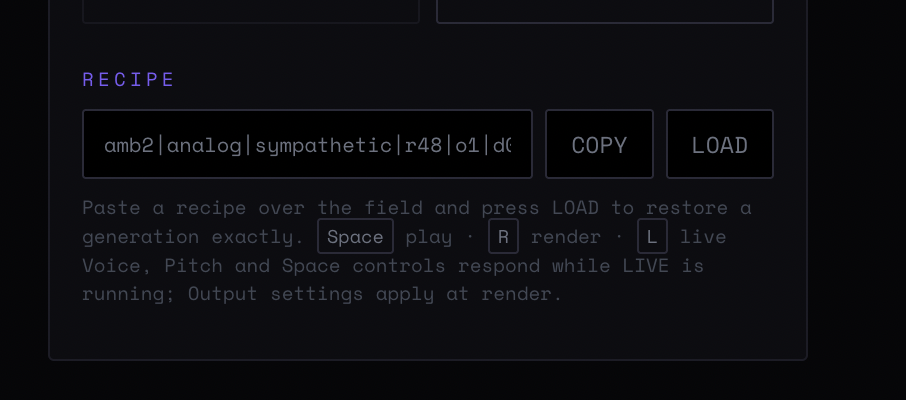
Figure 1 — The whole window: the parameter column with its four blocks, each carrying its own LIVE badge, and the sequence view with the meters beneath it
Chapter one
Voice
What each note is made of. Four algorithms, one filter, one length.
Analog swarm
Three detuned saws per note. The dense, warm option — a pad in the traditional sense. Detuning is part of the algorithm rather than a control, so the width comes for free.
FM drone
A two-operator carrier and modulator. Thinner and glassier than the swarm, and the one that gives metallic and bell-like results when the pitch material is sparse.
Modal pluck
A short excitation into a resonator. Notes have an attack, so the texture reads as played rather than as a wash. The best choice when the grid is set to a note value.
Harmonic stack
Sine partials. The cleanest and the quietest; it needs the shimmer and wash controls to become interesting, and it is the one that survives heavy processing afterwards.
Cutoff
One low-pass across the voice. Worth setting low and leaving low — an ambient texture that reaches 12 kHz competes with everything else in a mix.
Voice length
How long a single note lasts, in seconds. Together with density it decides how many notes overlap: long notes at high density is a chord, short notes at high density is a cloud.
Chapter two
Pitch
Where the notes come from. Five worlds, a root, and how far they spread.
Sympathetic strings
Tuned to reinforce each other. The consonant, harmonic option — the one that sounds composed.
Chaos meditation
Wide, slow-moving and deliberately unresolved. Long renders only; on a short one it sounds unfinished rather than unresolved.
Bell garden
Sparse, inharmonic, struck. Pair it with the modal pluck voice and a slow grid.
Analog warmth
Close intervals, slight detuning. The scale to use when the texture sits under something else and must not draw attention.
Particle field
Many small events across a wide register. Needs high density and a short voice length to read correctly.
Root
The tonal centre. The one control to match to the track you are rendering for.
Octave spread
None keeps everything in one register; ±1 and ±2 octaves open it out. Spread is what separates a pad from a landscape — but ±2 with high density fills the whole spectrum and leaves no room for anything else.
Chapter three
Time
Whether the texture has a pulse at all.
Tempo
BPM. Only meaningful once the grid is set to a note value.
Free — no pulse
Notes arrive when the engine feels like it. The correct setting for drones, beds and anything that has to sit under a scene without implying a tempo.
Bar and note divisions
From one bar down to a 1/16, with dotted and triplet values. Quantising an ambient texture sounds intentional rather than rhythmic — a 1/2 dotted grid gives shape without a beat.
Chapter four
Space
The three controls that turn notes into a texture. In practice this is where most of the work happens.
Density
How often notes arrive. With a long voice length, raising density thickens the chord; with a short one it turns the texture granular.
Wash
The diffuse tail. This is the reverb of the engine, and the control that decides whether the result is a patch or a place.
Shimmer
Pitched content in the tail — octaves and fifths fed back. A little is air; a lot is the recognisable shimmer reverb sound, which is a strong flavour.
Decay
How long the space rings, in seconds. Set it shorter than you think: the render's tail handling has to deal with whatever is still sounding at the end.
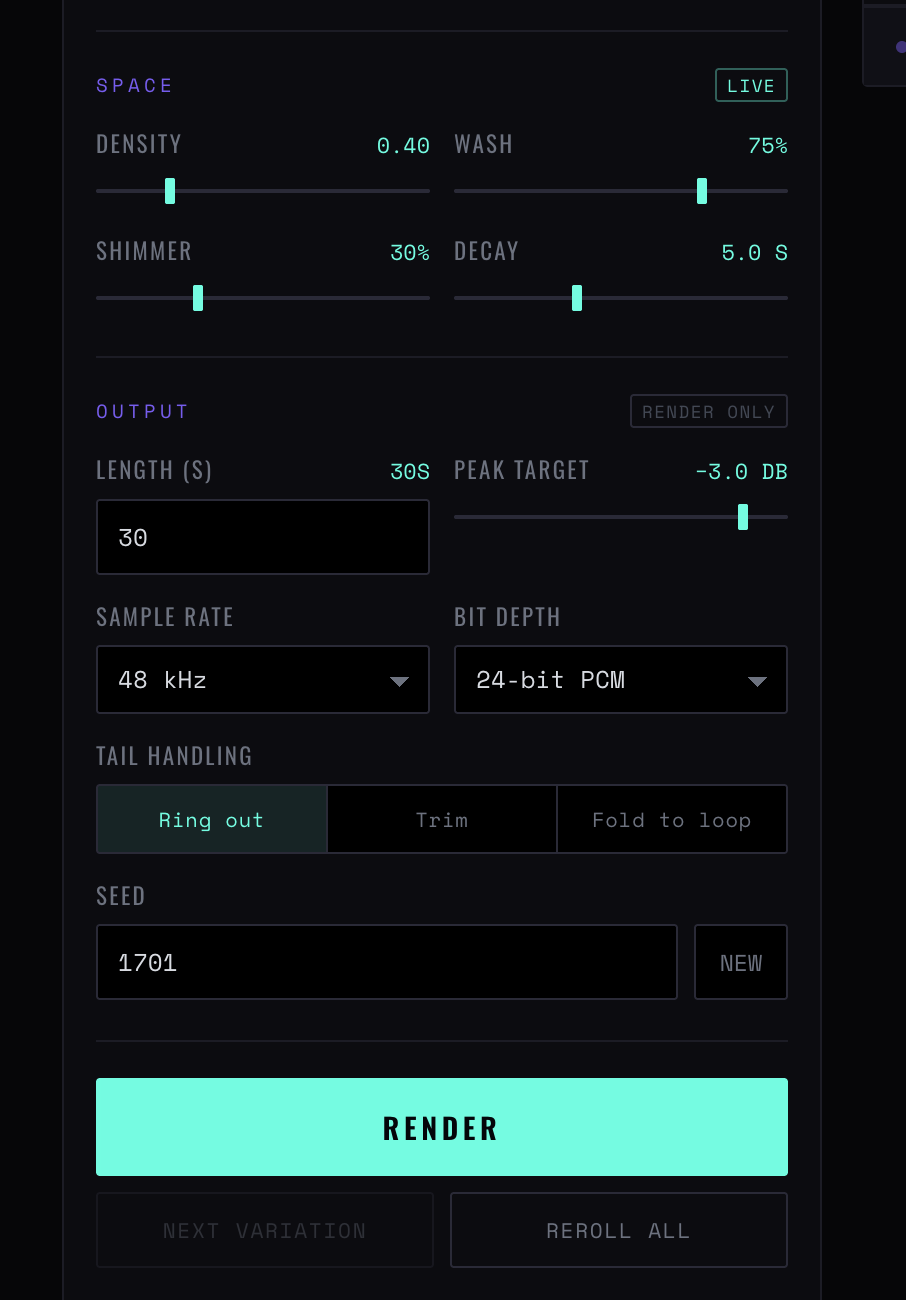
Space, output and the render button
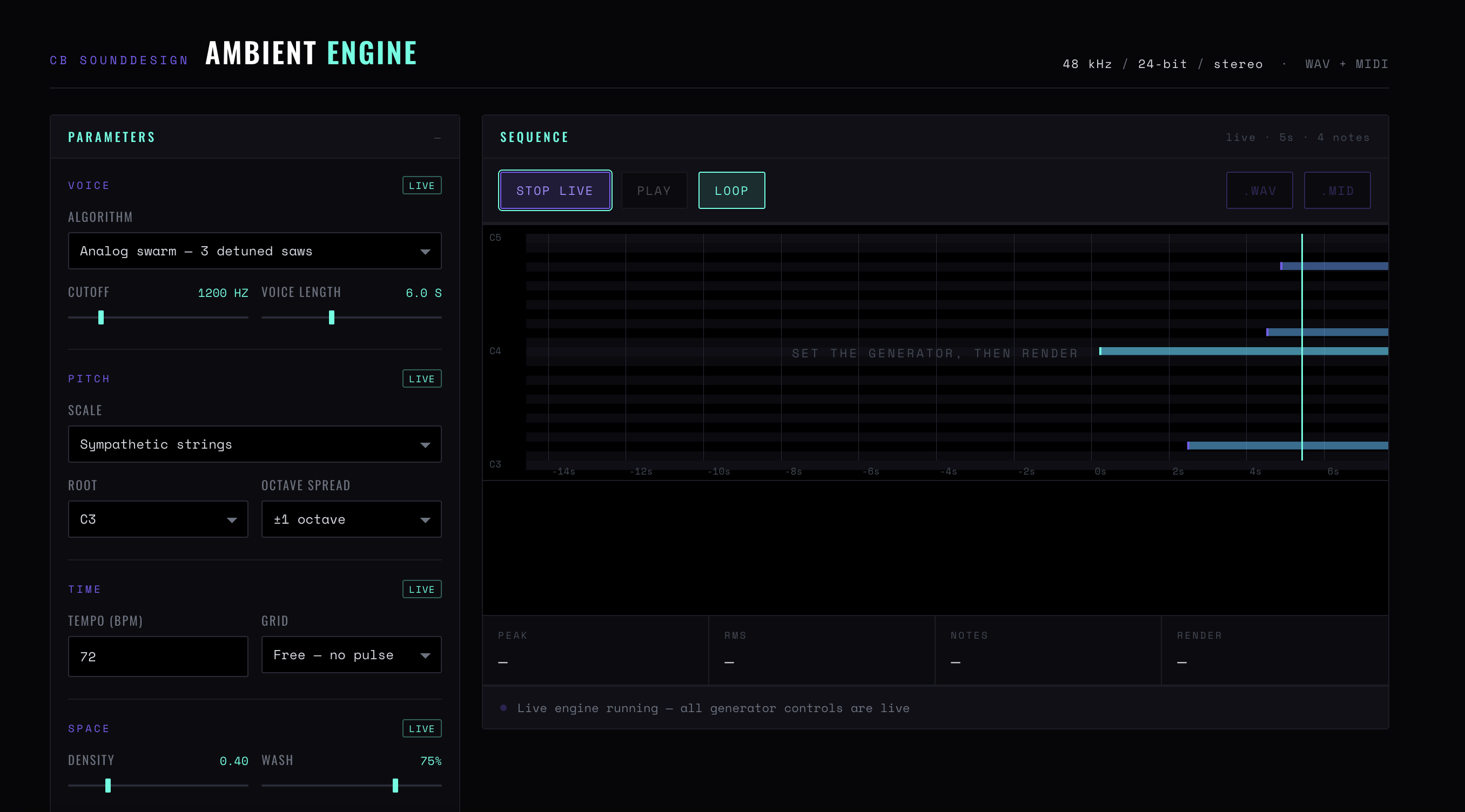
The recipe field, with its shortcuts
Figure 2 — The output block and the recipe. Space plays, R renders, L toggles live; Voice, Pitch and Space respond while LIVE is running, and the Output settings apply at render
Chapter five
Output and render
What the file is, and how it ends.
Length
Render length in seconds. The live preview does not have a length — this is only for the file.
Peak target
Normalisation ceiling, defaulting to −3 dB. Leave headroom: an ambient bed is almost always processed further downstream.
Sample rate / Bit depth
44.1, 48 or 96 kHz; 16-bit, 24-bit or 32-bit float. 24-bit at 48 kHz is the sane default. 32-bit float only if the file goes straight back into a DAW.
Ring out
Lets the tail finish past the stated length. The file is longer than you asked, and correct.
Trim
Cuts at the stated length. Honest but abrupt; use it when the file will be faded in an editor anyway.
Fold to loop
Wraps the tail back into the head so the file loops seamlessly. The setting for game and installation audio, and the reason to keep decay short — a long decay folded into a short render muddies the start.
Recipe / Copy / Load
The whole patch as text, including the seed. Copy it into your project notes; loading it back reproduces the render exactly. This is the archival format, not the browser.
.WAV / .MID
The audio, and the note events that produced it. The MIDI file lets you re-voice the same texture with your own instruments — the engine's composition without its sound.
Chapter six
Reading the meters
Peak / RMS
Peak for clipping, RMS for how loud it actually feels. An ambient render with a peak near the target and a very low RMS has one loud event in it — find it before you use the file.
Sequence
The note events as they fire. Useful for confirming that the grid is doing what you set, particularly on the free setting where there is nothing else to look at.
Set the generator, then render
The idle message. It means no render exists yet, not that anything is wrong.
CB Sounddesign · Ambient EngineOperator's manual · v1.0